How Do I Install Pokémon Super Gold 97?
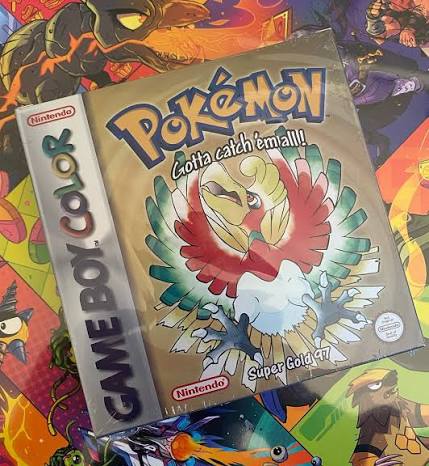
Pokémon Super Gold 97 is a completed Game Boy/Game Boy Color ROM hack that imagines what Pokémon Gold might have looked like if development had continued directly from the famous 1997 Spaceworld demo instead of evolving into the final Pokémon Gold and Silver we received in 1999.
Created primarily by lvl_3, Super Gold 97 reconstructs the Spaceworld-era Nihon region, restores prototype Pokémon and graphics, uses demo-inspired menus and mechanics, and builds them into a full game with eight Badges, a Pokémon League, postgame content, all 251 prototype-era Pokémon obtainable, and support for original Game Boy, Super Game Boy, and Game Boy Color hardware.
Installing it is relatively simple once you avoid its biggest source of confusion:
Pokémon Super Gold 97 uses Pokémon Gold as its base ROM.
It does not use Pokémon Crystal.
That is one of the major installation differences between Super Gold 97 and Pokémon Gold/Silver 97: Reforged, which we covered in the previous guide.
The basic setup is:
Clean English Pokémon Gold + Super Gold 97 IPS patch = Pokémon Super Gold 97
For the normally distributed English patch, the newest public patch I could verify is:
Super Gold 97 v7.41
However, there is an interesting version wrinkle. The official source-code changelog now contains additional v7.42 changes involving battle HUD and PC icon colors, but I could not verify a publicly distributed SuperGold97_7_42.ips release. Meanwhile, community records continued identifying v7.41 as the latest distributed English patch into late 2025.
So for a normal player installing the released patch:
Use v7.41 unless the official PokéCommunity/Discord download has since been updated beyond it.
Rom Professor does not provide, host, or link to copyrighted Pokémon Gold ROM files or pre-patched Pokémon Super Gold 97 ROMs. You need to provide your own legally obtained clean Pokémon Gold ROM and apply the fan-made IPS patch yourself.
What You Need Before Installing Pokémon Super Gold 97
You need:
- A clean English Pokémon Gold ROM
- The current official Pokémon Super Gold 97 IPS patch
- An IPS-compatible ROM patcher
- A Game Boy/Game Boy Color emulator
- Working normal battery-save support
- Working RTC support for the intended clock experience
- A backup location for your ROM and save
- Preferably the official Super Gold 97 Player’s Guidebook
For the current publicly verified English release, your setup should look like this:
| Requirement | Correct Choice |
|---|---|
| Hack | Pokémon Super Gold 97 |
| Creator | lvl_3 |
| Base game | Pokémon Gold |
| Region | USA / Europe English |
| Base SHA-1 | d8b8a3600a465308c9953dfa04f0081c05bdcb94 |
| Patch format | IPS |
| Latest distributed patch I could verify | v7.41 |
| Newer source changes visible? | Yes, v7.42 in source changelog |
| Game Boy support | Yes |
| Super Game Boy support | Yes |
| Game Boy Color support | Yes |
| RTC recommended | Yes |
The official project’s own source repository verifies the Pokémon Gold base SHA-1 and describes Super Gold 97 as a completed interpretation of the Spaceworld 1997 demo.
Do Not Confuse Super Gold 97 With Gold/Silver 97: Reforged
These are related projects, but they are not the same ROM hack.
This causes a ridiculous amount of installation confusion.
Pokémon Super Gold 97
Created primarily by lvl_3.
Uses:
Pokémon Gold
as its technical base.
Its goal is to feel like an authentic hypothetical “Pokémon Gold” that might have resulted directly from the 1997 Spaceworld prototype.
The game’s own guidebook says Super Gold 97 aims for a mostly unique “Pokémon 1.5 generation” experience and specifically warns readers not to use the guide for Reforged because many details differ.
Pokémon Gold/Silver 97: Reforged
A later project based partly on Super Gold 97’s foundation.
Uses:
Pokémon Crystal
as its base.
Reforged introduces its own design changes, Pokémon stats, locations, Trainer parties, postgame material, and more modern ROM-hack-style refinements.
Quick Comparison
| Feature | Super Gold 97 | Gold/Silver 97: Reforged |
|---|---|---|
| Base ROM | Pokémon Gold | Pokémon Crystal |
| Main creator/project | lvl_3 | Reforged team |
| Versions | One main Gold version | Gold and Silver versions |
| Design goal | Authentic Spaceworld-style “Gen 1.5” | Modernized reinterpretation |
| Main patch format | IPS | IPS |
| All 251 obtainable | Yes | Yes |
| Separate article | This guide | Previous Rom Professor guide |
If you downloaded a Reforged patch:
do not follow this article.
What Base ROM Does Pokémon Super Gold 97 Use?
Use the clean standard English:
Pokémon Gold Version (USA, Europe)
The official Super Gold 97 source’s roms.sha1 file identifies the Gold base as:
d8b8a3600a465308c9953dfa04f0081c05bdcb94
The pret Pokémon Gold/Silver disassembly independently identifies the same English Pokémon Gold ROM with the same SHA-1.
Correct Super Gold 97 Base
| Item | Value |
|---|---|
| Game | Pokémon Gold Version |
| Language | English |
| Region | USA / Europe |
| Common description | SGB Enhanced |
| SHA-1 | d8b8a3600a465308c9953dfa04f0081c05bdcb94 |
That checksum is much more reliable than whatever filename your ROM happens to have.
A file named:
Pokemon Gold.gbc
could contain:
- A modified Gold ROM
- Another ROM hack
- A bad dump
- An already patched Super Gold 97
- The wrong regional release
The SHA-1 tells you what the data actually is.
Do Not Use Pokémon Crystal
Super Gold 97 does not use Crystal.
That was the base for the previous hack in our series:
Gold/Silver 97: Reforged.
For Super Gold 97:
Gold means Gold.
Use:
d8b8a3600a465308c9953dfa04f0081c05bdcb94
as your verification target.
Do Not Use Pokémon Silver
Despite being inspired by the Pokémon Gold and Silver Spaceworld Demo, there is no accompanying Super Silver 97 version.
The official Super Gold 97 Player’s Guide explains that the project intentionally represents one hypothetical finished Pokémon Gold and that creating a separate Silver version was not considered necessary.
So:
Do not patch the IPS onto Pokémon Silver.
Use Pokémon Gold.
What Is the Latest Version of Pokémon Super Gold 97?
For normal patch installation, the latest publicly distributed English patch I could verify is:
v7.41
Community patch records identify:
SuperGold97_7_41.ips
applied to:
Pokémon Gold Version (USA, Europe) (SGB Enhanced).
Version 7.41 added/fixed:
- Trading between two copies of Super Gold 97
- Battling between two copies of Super Gold 97
- Paralyze Heal placement in the Underground
- A Trainer walking through trees in National Park
Those changes are preserved in the official source changelog.
But What About v7.42?
The official source changelog goes one entry further:
v7.42
with changes to:
- Poké Ball icons
- HP bar colors
- Held-item icon colors in Bill’s PC
to more closely match the Spaceworld demo.
However, I could not verify a corresponding publicly distributed:
SuperGold97_7_42.ips
in current search results.
Late-2025 community discussion still referred to v7.41 as the latest English patch being linked.
Therefore:
If You Are Patching a Normal Download
Use:
v7.41
unless the official project source/Discord now supplies a newer patch.
If You Are Compiling From Current Source
The repository contains the newer 7.42 changes.
That distinction is worth preserving rather than pretending the public patch and development source are always identical.
Where to Get Pokémon Super Gold 97 Safely
The project itself says the game and its guidebook should be obtained through the official PokéCommunity page or Super Gold 97 Discord community, not redistributed elsewhere.
Pokémon Super Gold 97 official PokéCommunity thread
The source code is also publicly available from lvl_3:
Pokémon Super Gold 97 source repository
The source repository is useful for:
- Verifying the creator/project
- Checking game features
- Reading the current changelog
- Confirming the Gold base ROM hash
- Seeing newer source changes
- Building from source if you know RGBDS
It does not host Nintendo’s Pokémon Gold ROM.
Avoid Pre-Patched ROM Downloads
Do not search for:
Pokemon Super Gold 97 ROM download
and grab a complete .gbc from some random ROM site.
Besides the copyright issue, you have no way to know whether you received:
- v7.10
- v7.22
- v7.33
- v7.40
- v7.41
- An unofficial modification
- A translated version
- The no-GBC variant
- Reforged mislabeled as Super Gold 97
- A corrupted ROM
Patching the official IPS yourself removes most of that uncertainty.
What Patch Format Does Pokémon Super Gold 97 Use?
The normal English release uses:
IPS
The v7.41 community release record specifically identifies:
SuperGold97_7_41.ips
as the main patch.
That patch is applied to clean Pokémon Gold.
The resulting .gbc file is what you actually play.
The .ips file itself cannot be opened as a game.
Main v7.41 vs. No-GBC v7.41
The v7.41 distribution has also been documented with two English variants:
Main release
SuperGold97_7_41.ips
and:
No GBC support release
SuperGold97_7_41_GB.ips
For almost everyone:
use the main release.
The standard project supports:
- Original Game Boy
- Super Game Boy
- Game Boy Color
including two Game Boy Color palette modes.
The _GB variant is a special compatibility-oriented alternative for players who specifically do not want/use the newer GBC color support.
If you are playing on:
- SameBoy
- BGB
- mGBA
- A real Game Boy Color
- A normal modern GBC setup
use the standard patch unless the project documentation tells you otherwise.
How to Patch Pokémon Super Gold 97
Step 1: Download the Current Super Gold 97 IPS
Use the official PokéCommunity/Discord release.
For the public patch I can currently verify, look for:
SuperGold97_7_41.ips
Do not accidentally select:
SuperGold97_7_41_GB.ips
unless you intentionally want the no-GBC-support build.
Step 2: Prepare Clean Pokémon Gold
Locate your legally obtained Pokémon Gold ROM.
Expected SHA-1:
d8b8a3600a465308c9953dfa04f0081c05bdcb94
If the ROM is inside:
.zip
.rar
or:
.7z
extract it first.
You need the actual ROM file.
Step 3: Keep an Untouched Copy
Make a backup such as:
Pokemon Gold CLEAN.gbc
Do not patch your only clean copy.
That clean Gold file will also be useful if:
- Super Gold 97 receives another patch
- You want to try the GB-only version
- You need to troubleshoot
- You want another Gold-based hack later
Step 4: Open an IPS-Compatible Patcher
Good options include:
- Rom Patcher JS
- Floating IPS / FLIPS
- Lunar IPS
Rom Patcher JS is especially convenient because it runs in a browser.
Step 5: Select Pokémon Gold
Under the source/ROM field select:
Pokemon Gold CLEAN.gbc
Do not select:
- Pokémon Silver
- Pokémon Crystal
- Super Gold 97
- Gold/Silver 97 Reforged
- The IPS itself
- Your
.sav
Step 6: Select the Super Gold 97 IPS
Select:
SuperGold97_7_41.ips
or whatever newer official patch the project currently distributes.
Step 7: Apply the Patch
Choose:
Apply Patch
The patcher will generate a new .gbc file.
Step 8: Rename the Finished ROM
A useful filename is:
Pokemon Super Gold 97.gbc
or:
Pokemon Super Gold 97 v7.41.gbc
If you expect to update later, I prefer:
Pokemon Super Gold 97.gbc
because your save can remain:
Pokemon Super Gold 97.sav
between versions.
Step 9: Open Super Gold 97 in Your Emulator
Launch your Game Boy/Game Boy Color emulator.
Open the newly patched .gbc.
Do not reopen:
Pokemon Gold CLEAN.gbc
If ordinary final-release Johto starts instead of Nihon:
you opened vanilla Gold.
Step 10: Verify the Version Number
Version 7.00 and later show the Super Gold 97 version number directly on the main menu, according to the game’s Player’s Guidebook.
That gives you a very easy verification step.
For the normal released patch discussed here, look for:
7.41
If your game says:
- 7.10
- 7.22
- 7.33
- 7.40
you have an older build.
Step 11: Make a Normal Save
Before committing to a playthrough:
- Start the game.
- Set the clock correctly.
- Make a normal in-game save.
- Close the emulator completely.
- Reopen Super Gold 97.
- Confirm Continue appears.
- Verify your time.
- Save again.
That tests both battery-save behavior and your basic clock setup.
Suggested screenshot: Capture Rom Patcher JS showing clean Pokémon Gold in the ROM field and the official Super Gold 97 IPS in the Patch field. This is especially useful because it makes the Gold-vs.-Crystal distinction obvious.
What Emulator Should I Use for Pokémon Super Gold 97?
The game is unusually flexible.
The official source advertises full support for:
- Original Game Boy
- Super Game Boy
- Game Boy Color
and two Game Boy Color color modes.
For modern emulation, use an accurate Game Boy/Game Boy Color emulator.
Good choices include:
- SameBoy
- BGB
- mGBA
- Gambatte
Best Emulator for Windows
For Windows:
BGB or SameBoy are excellent choices.
BGB is particularly useful if you want to experiment with:
- Game Boy mode
- Super Game Boy behavior
- Game Boy Color mode
because it exposes those older hardware modes clearly.
SameBoy is another accuracy-focused option.
mGBA is convenient if you already use it for your GBA and GBC ROM-hack library.
Best Emulator for Mac
Use:
SameBoy
or:
mGBA
Both handle Game Boy Color games well.
For the full experience:
- Enable/allow RTC
- Use normal battery saves
- Let the game run in GBC mode if you want the newer full-color presentation
Can I Play Super Gold 97 on Android?
Yes.
Use an accurate GB/GBC emulator.
Good options include RetroArch using:
- SameBoy
- Gambatte
- mGBA
cores.
The game is based on Pokémon Gold, so proper RTC and battery-save support matter more than fancy emulator extras.
Can I Play Super Gold 97 on iPhone?
Yes.
Once patched, the finished .gbc can be imported into a current Game Boy/Game Boy Color emulator such as:
- SameBoy
- Delta
- RetroArch
The process is:
- Patch Pokémon Gold.
- Save the completed Super Gold 97 ROM.
- Import the
.gbc. - Start the game.
- Set the clock.
- Make a normal save.
- Restart and verify it.
Do not import the IPS file as a game.
Should I Play in Game Boy, Super Game Boy, or Game Boy Color Mode?
You actually have choices.
Game Boy
The project explicitly supports original Game Boy hardware.
This gives the game a very authentic monochrome/prototype-era feel.
Super Game Boy
Super Gold 97 has specific SGB support and palettes designed to resemble the Spaceworld presentation.
This is arguably the most historically flavored way to experience it.
Game Boy Color
Later Super Gold 97 versions added a dedicated full GBC color mode with individually assigned tile and sprite colors.
Version 5.06 formally released the new GBC color mode, with the Options menu allowing players to switch between SGB-style and custom GBC colors when running on Game Boy Color hardware.
For most modern players:
Game Boy Color mode is my default recommendation.
If you want the most prototype-like atmosphere:
try the SGB palette mode too.
Best Emulator Settings for Pokémon Super Gold 97
| Setting | Recommendation |
|---|---|
| System | Game Boy Color |
| Alternate mode | Super Game Boy |
| Windows | BGB / SameBoy / mGBA |
| macOS | SameBoy / mGBA |
| Android | SameBoy/Gambatte/mGBA core |
| iPhone/iPad | SameBoy / Delta / RetroArch |
| Save type | Automatic/default |
| RTC | Enabled |
| Normal in-game saves | Yes |
| Save states | Secondary only |
| GBC color mode | Recommended |
| Fast-forward | Optional |
Does Pokémon Super Gold 97 Need RTC?
Yes, you should use an emulator with working real-time-clock behavior.
Super Gold 97 retains Pokémon Gold’s time system and includes:
- PokéGear clock
- Day-of-week behavior
- Time setting
- Morning/night palette behavior
- Other time-dependent systems
The official changelog includes several clock-specific changes, such as redesigning the PokéGear clock, having Professor Oak set the time during the introduction, fixing day-of-week resets, and correcting nighttime palette issues.
Version 7.22 specifically fixed a bug where the day of the week always reset to Sunday after the introduction.
So:
RTC is part of the intended experience.
Does Super Gold 97 Have Day and Night?
Yes.
The source changelog contains explicit fixes for:
- Nighttime tiles
- Morning color schemes
- PokéGear clock behavior
- Day-of-week behavior
showing that the Gold-style clock and time-of-day system remain part of the game.
If the clock never advances on your emulator:
switch emulator/core or fix RTC settings.
Can Super Gold 97 Run on Real Hardware?
Yes.
Unlike some hacks that only work reliably under modern emulation, the official project explicitly advertises:
- Original Game Boy support
- Super Game Boy support
- Game Boy Color support
You still need appropriate flash hardware that supports:
- The ROM size
- Battery saves
- Pokémon Gold’s mapper
- RTC if you want correct clock behavior
Game Boy Advance Flashcart Warning
A GBA flashcart is not automatically the same thing as a native Game Boy/Game Boy Color flashcart.
Some GBA flashcarts run GB/GBC games through an emulator such as Goomba rather than through the console’s native GBC mode, and compatibility can vary. Community Super Gold 97 users have run into exactly this distinction.
For the most authentic hardware setup:
use a proper GB/GBC flashcart with save and RTC support.
Super Gold 97 Has a Full Player’s Guidebook
This is one of the coolest things about the project.
The official source tells players that the Super Gold 97 Discord contains a roughly 300-page Player’s Guidebook with:
- Full walkthrough
- Pokédex
- Pokémon information
- Locations
- Movesets
- Stats
- Other game information
The guide itself explicitly says it should be used only for Super Gold 97 and not Reforged because the two games have significant differences.
After installing:
get the guidebook.
It is one of the best resources available for this game.
How to Update Pokémon Super Gold 97 Without Losing Your Save
Super Gold 97 was updated many times over its life.
The source changelog goes from early 1.x versions through 7.x, and several updates explicitly contain fixes for problems affecting older saves.
That strongly suggests the project generally expected players to continue saves through many updates.
However:
I could not verify a blanket official guarantee that every save from every Super Gold 97 version is compatible with every later version.
So update carefully.
Step 1: Make a Normal In-Game Save
Use the game’s normal SAVE option.
Do not depend solely on a save state.
Then close the emulator completely.
Step 2: Back Up Your .sav
Make a copy of the battery save.
For example:
Pokemon Super Gold 97 BACKUP.sav
Keep this indefinitely.
Step 3: Keep the Old ROM
Do not delete the current working Super Gold 97 ROM.
You want:
old ROM + old save
available together if something goes wrong.
Step 4: Download the New IPS
Only update when you have verified that the patch is actually newer.
For ordinary public installation, the latest patch I can currently verify is:
v7.41.
Step 5: Return to Clean Pokémon Gold
Do not patch:
7.41 IPS → Super Gold 97 7.40 ROM
unless the creator specifically tells you to.
Instead:
Clean Pokémon Gold + 7.41 IPS = fresh 7.41 ROM
That avoids stacking complete IPS changes on modified data.
Step 6: Keep the Same Main Variant
If your save was created with the standard GBC-capable build:
stay with the normal build.
Do not casually swap between:
- Main version
_GBno-GBC-support version- Translation forks
using an important save unless you have tested compatibility.
Step 7: Match the ROM and Save Filenames
Many emulators match games and saves by name.
For example:
Pokemon Super Gold 97.gbc
Pokemon Super Gold 97.sav
If your new ROM becomes:
Pokemon Super Gold 97 v7.41.gbc
the emulator may look for:
Pokemon Super Gold 97 v7.41.sav
and appear to lose your progress.
The old save usually still exists.
Back up before renaming.
Step 8: Load the Existing Save
Launch the new ROM.
Choose:
Continue
Check:
- Party
- PC boxes
- Items
- Badges
- Pokédex
- Story flags
- Current location
- Clock/day
Step 9: Check for Old-Save Oddities
Super Gold 97’s changelog specifically references historical fixes for older saves.
Examples include:
- An old-save issue showing two Blues in Oak’s Lab
- A function for renaming the player’s mother on old saves
- A workaround for an older-save sprite bug
That means an old save can sometimes contain stale event or cosmetic state after a major update even if it technically loads.
If something looks strange:
consult the changelog/guide before assuming the entire save is corrupt.
Step 10: Save Again
Once everything looks correct:
- Make a fresh in-game save.
- Close the emulator.
- Reopen.
- Verify it again.
Keep the old backup.
Should You Use Save States to Update?
No.
Use the normal battery save.
A save state captures the emulator’s RAM, CPU state, and other data from the old ROM.
Loading that state into a different Super Gold 97 build can reintroduce old code/data into the new version.
For migration:
.sav good.
Old save state bad.
Common Pokémon Super Gold 97 Installation Problems
“I Patched Pokémon Crystal”
Wrong game.
That is the base for Gold/Silver 97: Reforged.
Super Gold 97 requires:
Pokémon Gold.
“I Patched Pokémon Silver”
Also wrong.
There is only one main Super Gold 97 version.
Use Pokémon Gold.
“What SHA-1 Should Pokémon Gold Have?”
The correct English Gold source is:
d8b8a3600a465308c9953dfa04f0081c05bdcb94
“The IPS Patch Won’t Apply”
Verify:
- Correct Pokémon Gold
- Clean ROM
- Correct region
- Correct IPS
Do not try to force a patch onto:
- Silver
- Crystal
- Reforged
- An old Super Gold 97 ROM
“My Emulator Won’t Open the IPS File”
That is normal.
An .ips file is a patch.
Use an IPS patcher to combine it with Pokémon Gold.
Then open the resulting .gbc.
“Can I Rename .ips to .gbc?”
No.
Changing the extension does not apply the patch.
“Normal Pokémon Gold Starts”
You opened the clean base ROM.
Keep files clearly separated:
Pokemon Gold CLEAN.gbc
Pokemon Super Gold 97.gbc
“My Version Says 7.33”
That is an older release.
The Player’s Guide says 7.33 or newer is required for its current documentation, but v7.41 was later publicly distributed.
Update if possible.
“My Version Says 7.40”
That is one release behind the latest public patch I could verify.
v7.41 fixed:
- Trading
- Battling
- Underground item placement
- National Park Trainer movement
“I Saw v7.42 in the Changelog”
You did.
The official source changelog contains v7.42 adjustments.
However, I could not verify a public SuperGold97_7_42.ips.
If the official Discord now supplies it:
follow the official release.
Otherwise:
v7.41 remains the latest distributed English patch I can verify.
“My Day Keeps Resetting”
Old versions had a specific bug where the day of the week reset to Sunday after the intro.
That was fixed in:
v7.22.
If you are on a newer version and the clock still resets:
check your emulator’s RTC.
“The Game Is Black and White”
That can be intentional if you are running in original Game Boy mode.
Super Gold 97 supports:
- GB
- SGB
- GBC
For full color:
use Game Boy Color mode and check the in-game color option.
“The Colors Look Different From Screenshots”
The game supports multiple color styles.
On GBC hardware, later versions allow choosing between:
- SGB-style color presentation
- Custom GBC color presentation
The full GBC color system was released in v5.06.
“Can I Complete the Pokédex Without Trading?”
Yes.
The official source says all:
251 Pokémon
are obtainable in one save file.
Trade evolutions are handled using the game’s:
Covenant Orb.
That means you do not need another game solely to evolve trade-evolution Pokémon.
“Does Trading Work?”
Yes.
Version 7.41 specifically fixed trading and battling:
between two copies of Super Gold 97.
If link functionality matters to you:
make sure you are not using an older build.
“Is Super Gold 97 Hard?”
It is somewhat harder than final Pokémon Gold but is not designed as a hardcore difficulty hack.
The official source says the level curve is generally higher and slightly tougher than final Gold without being excessively difficult.
“Is Super Gold 97 Complete?”
Yes.
The official source explicitly describes:
- Eight Badges
- Pokémon League
- Full-length game
- Original postgame map
- Gym Leader/Pokémon League rematches
The project is not merely a reconstructed Spaceworld demo.
It turns the prototype concepts into a finished adventure.
“Does It Have All 251 Prototype Pokémon?”
Yes.
The creator says the game includes the complete 251-Pokémon Pokédex as represented by the demo concept, with all 251 obtainable in one save.
“Does It Have the Skateboard?”
Yes.
The skateboard—one of the famous ideas seen around the Spaceworld-era Pokémon development material—is implemented.
“Does It Have the Pikachu Minigame?”
Yes.
At the title screen:
hold Left + B and wait for the music to finish.
The official source lists the minigame as a feature.
How to Verify That Pokémon Super Gold 97 Installed Correctly
Check the Base ROM First
Correct Pokémon Gold SHA-1:
d8b8a3600a465308c9953dfa04f0081c05bdcb94
Check the Version Number
Version 7.x displays the game version on the main menu.
For the latest public patch I could verify:
look for:
7.41.
Check the Region
You should begin in:
Nihon
not ordinary final-game Johto.
The game’s story is constructed from the Spaceworld demo foundation and sends you across a Japan-inspired Nihon region.
Check the Interface
Super Gold 97 deliberately reconstructs:
- Prototype Pokédex
- Prototype Pack/menu styling
- Prototype Pokémon graphics
- Spaceworld-style tilesets
- Beta-inspired UI
Test Color Modes
On a GBC-capable emulator, check the color option.
You should be able to experience the newer dedicated GBC color presentation.
Test the Save and Clock
- Make a normal save.
- Close the emulator.
- Reopen.
- Confirm Continue appears.
- Check the time/day.
- Load your save.
- Save again.
If the game shows the correct Super Gold 97 version, runs in Nihon, retains your save, and maintains the clock:
your installation is ready.
Pokémon Super Gold 97 Installation FAQ
What is the latest version of Pokémon Super Gold 97?
The newest publicly distributed English patch I could verify is:
v7.41.
The source-code changelog contains a newer v7.42 entry, but I could not verify that a public 7.42 IPS has been released.
What base ROM does Super Gold 97 use?
Clean English:
Pokémon Gold Version USA/Europe
SHA-1:
d8b8a3600a465308c9953dfa04f0081c05bdcb94
Does Super Gold 97 use Pokémon Crystal?
No.
That is Gold/Silver 97: Reforged.
Super Gold 97 uses Gold.
Does it use Pokémon Silver?
No.
There is no normal separate Super Silver 97 release.
What patch format does it use?
IPS.
The publicly documented v7.41 patch is:
SuperGold97_7_41.ips.
Where should I get the patch?
Use the project’s official PokéCommunity/Discord sources.
Official Super Gold 97 PokéCommunity thread
The project’s own Player’s Guide says the patch and guide should only be obtained from the PokéCommunity project page or its community.
Which emulator should I use?
Good options include:
- BGB
- SameBoy
- mGBA
- Gambatte
Can I play on Android?
Yes.
Use a modern accurate GB/GBC emulator with proper save and RTC support.
Can I play on iPhone?
Yes.
Patch the game first and import the finished .gbc into a current Game Boy Color emulator.
Can I play on original Game Boy?
Yes.
The creator explicitly supports original Game Boy hardware.
Can I play on Super Game Boy?
Yes.
Super Gold 97 has dedicated SGB support and Spaceworld-inspired palettes.
Can I play on Game Boy Color?
Yes.
The project has full GBC support and a dedicated custom GBC color mode.
Does it need RTC?
Use RTC support.
The game retains the clock/day systems and includes numerous time-specific fixes and features.
Can I keep my save when updating?
Many older saves were clearly expected to continue because the developer added multiple old-save compatibility fixes.
However, I could not verify a universal compatibility guarantee.
Back up the .sav, patch a fresh Pokémon Gold ROM, and test your save in the new version before replacing anything.
Do I patch the new version over the old Super Gold 97 ROM?
No.
Use a fresh clean Pokémon Gold ROM with the new IPS.
Then reuse a backed-up battery save if compatible.
Can I catch all 251 Pokémon?
Yes.
All 251 are obtainable in a single save.
Do I need to trade for trade evolutions?
No.
Super Gold 97 includes the Covenant Orb for Pokémon that would normally require trading.
Is Super Gold 97 complete?
Yes.
It includes eight Badges, the Pokémon League, a full campaign, and postgame content.
Is Super Gold 97 the same as Reforged?
No.
Super Gold 97 is the original lvl_3 project and aims for a more authentic Spaceworld/“Gen 1.5” experience.
Reforged is a separate fork with substantial differences in Pokémon data, Trainers, locations, mechanics, and postgame content.
Where should I go after installing Pokémon Super Gold 97?
Once the game is running correctly, read our Pokémon Super Gold 97 beginner guide.
Even experienced Pokémon Gold players will find Nihon unfamiliar. Super Gold 97 changes:
- Region layout
- Pokémon roster/designs
- Evolutions
- Type chart
- Moves
- Gym progression
- Key items
- Pokémon locations
- Postgame
- Prototype mechanics
The official project’s 300-page Player’s Guidebook is also an excellent resource for a serious playthrough.
For future patch changes beyond publicly verified v7.41—or if a proper 7.42 IPS appears—see our Pokémon Super Gold 97 latest version guide.
And if you want to compare the two major approaches to completing the Spaceworld 97 concept, see our separate Pokémon Gold/Silver 97: Reforged guide.
Suggested article screenshots: Capture your own Super Gold 97 title/main-menu screen showing the version number, plus a patching screenshot showing Pokémon Gold as the source ROM. The question-bank brief specifically calls for a title screen, patching screen, or official project-page screenshot, and the Gold-base screenshot helps prevent readers from confusing this game with Crystal-based Reforged.