How to Download and Install Pokémon Dark Violet Safely
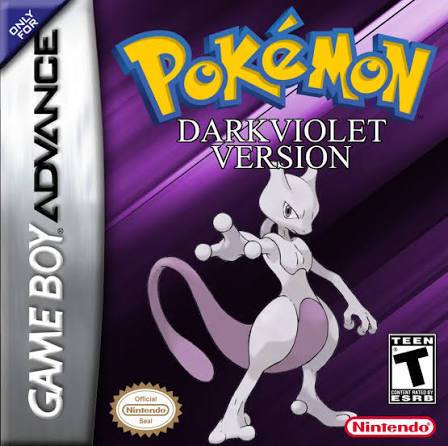
Pokémon Dark Violet is a completed Pokémon FireRed ROM hack originally created by Chaos Rush. Rather than simply upgrading FireRed, Dark Violet reimagines the original Generation 1 Kanto adventure with a heavily rewritten story, redesigned maps, additional characters, expanded Team Rocket involvement, modernized battle mechanics, and a roster of 210 obtainable Pokémon.
Dark Violet includes 113 additional moves, a physical/special split, redesigned Pokémon movesets, DS-style Pokémon sprites, custom battle themes, extensively redone music, and Kanto maps inspired partly by HeartGold and SoulSilver. The game itself was re-scripted and re-mapped extensively instead of simply modifying a few FireRed events. citeturn305462search7turn656972search2
The version I recommend for a normal playthrough is the 2019 completion patch referenced by the original Pokémon Dark Violet PokéCommunity thread. RetroAchievements also explicitly directs players to that 2019 patch and says it must be applied to Pokémon FireRed 1.0. citeturn773343view0
A later 2022 community revision also exists, but it is not as straightforward. Its maintainer, Verloren 5, reportedly said Chaos Rush gave permission for the update, but no public statement from Chaos Rush has independently confirmed that. For that reason, this guide treats the 2019 completed version as the canonical installation and the 2022 build as an optional community modification. citeturn305462search9
What You Need Before Installing Pokémon Dark Violet
Before you begin, you need:
- A legally obtained clean Pokémon FireRed USA v1.0 ROM
- The Pokémon Dark Violet 2019 IPS patch
- An IPS-compatible ROM patcher
- A Game Boy Advance emulator
- A backup of any existing Dark Violet save if you have played before
The finished game should be a:
.gba
file.
Dark Violet’s traditional patch is distributed in:
.ips
format. Modern patching references also identify Dark Violet as a FireRed-based IPS hack. citeturn732359search0turn732359search4
For most players today, Rom Patcher JS is the easiest way to apply it.
Other options include:
- Lunar IPS on Windows
- UniPatcher on Android
- MultiPatch-compatible tools on macOS
Rom Professor does not host, provide, or link to copyrighted Pokémon FireRed ROM files or unofficial pre-patched Pokémon Dark Violet ROMs.
What Base ROM Does Pokémon Dark Violet Use?
Pokémon Dark Violet requires:
Pokémon FireRed USA v1.0
The RetroAchievements Dark Violet documentation specifically warns that the 2019 patch must be applied to FireRed 1.0 or it will not work. citeturn773343view0
The standard English FireRed v1.0 ROM has this SHA-1 checksum:
41cb23d8dccc8ebd7c649cd8fbb58eeace6e2fdc
The revised FireRed v1.1 ROM instead has:
dd5945db9b930750cb39d00c84da8571feebf417
The pret FireRed decompilation project documents both of these hashes. citeturn511921search0turn511921search4
| Requirement | Pokémon Dark Violet |
|---|---|
| Base game | Pokémon FireRed |
| Platform | Game Boy Advance |
| Region | USA |
| Required revision | FireRed v1.0 / Rev 0 |
| Expected SHA-1 | 41cb23d8dccc8ebd7c649cd8fbb58eeace6e2fdc |
| ROM condition | Clean and unmodified |
| Main patch format | IPS |
| Finished extension | .gba |
| Recommended release | 2019 completion patch |
| Creator | Chaos Rush |
Do not use:
- FireRed v1.1
- Pokémon LeafGreen
- Pokémon Emerald
- Another FireRed ROM hack
- A randomized FireRed ROM
- An already-patched Dark Violet ROM
- A modified FireRed ROM
Using the wrong FireRed revision is one of the easiest ways to create a ROM that crashes or simply refuses to boot.
How to Verify Your Pokémon FireRed ROM
If possible, calculate the SHA-1 checksum before patching.
For FireRed v1.0, you want:
41cb23d8dccc8ebd7c649cd8fbb58eeace6e2fdc
If you instead get:
dd5945db9b930750cb39d00c84da8571feebf417
you have FireRed v1.1. citeturn511921search0
That ROM is not the one the Dark Violet 2019 patch expects.
Renaming:
Pokemon FireRed v1.1.gba
to:
Pokemon FireRed v1.0.gba
does nothing.
The actual internal game data is different.
Which Pokémon Dark Violet Version Should You Install?
This question has become more complicated because several Dark Violet builds circulate online.
Recommended: 2019 Completion Patch
For a normal Dark Violet playthrough, use the 2019 patch referenced through the original PokéCommunity project thread.
RetroAchievements specifically says:
- Get the 2019 patch.
- Apply it to FireRed 1.0.
That is the clearest surviving version guidance connected back to Dark Violet’s original project thread. citeturn773343view0
Current databases generally refer to this completed build as:
Dark Violet Final 2019 v1
or simply:
Dark Violet v1.0
Whack a Hack identifies the project as completed and labels it 2019V1. citeturn305462search7
What Is the 2022 Dark Violet Version?
A later community update appeared in 2022 under the name of Verloren 5.
Changes reportedly include:
- Additional decapitalization
- Black/White-style interface graphics
- Updated PC menus
- Updated Bag interface
- Updated Party and Summary screens
- Updated Pokédex and Options screens
- EXP after catching Pokémon
- Other quality-of-life and graphical adjustments
However, the source distributing this build explicitly notes that while Verloren 5 says permission came from Chaos Rush, there is no public statement from Chaos Rush confirming it. citeturn305462search9
Because of that, I would treat the 2022 build as:
An unofficial community revision of Dark Violet
rather than calling it the definitive creator release.
For this guide, install the 2019 completion patch unless you specifically want the later community modification.
Where to Get the Official Pokémon Dark Violet Patch
The original Pokémon Dark Violet project was published through PokéCommunity by Chaos Rush.
The original thread is:
PokéCommunity thread ID 291789
RetroAchievements continues to point players back to that thread and specifically tells them to use the 2019 patch. citeturn773343view0
When looking for the correct file, you want the:
2019 Dark Violet IPS patch
not a full .gba.
Avoid downloads advertised as:
Pokemon Dark Violet Final.gba
or:
Pokemon Dark Violet Pre-Patched ROM
The correct process is:
Your clean FireRed v1.0 ROM + Dark Violet IPS patch = Pokémon Dark Violet
How to Patch Pokémon Dark Violet
The simplest modern method is Rom Patcher JS.
Step 1: Prepare Pokémon FireRed v1.0
Locate your legally obtained Pokémon FireRed ROM.
It should end in:
.gba
For example:
Pokemon FireRed.gba
If your backup is stored inside a:
.zip
.rar
or:
.7z
archive, extract the actual .gba file first.
Keep one untouched FireRed backup somewhere safe.
Step 2: Verify FireRed v1.0
If possible, verify this SHA-1:
41cb23d8dccc8ebd7c649cd8fbb58eeace6e2fdc
That confirms the standard FireRed Rev 0 base documented by pret. citeturn511921search1
Step 3: Download the Dark Violet Patch
Get the 2019 Dark Violet patch associated with Chaos Rush’s original PokéCommunity project.
The patch should be an:
.ips
file.
Do not try to open the IPS patch itself in an emulator.
Step 4: Open Rom Patcher JS
Open Rom Patcher JS.
You should see separate fields for:
ROM file
and:
Patch file
Step 5: Select Pokémon FireRed
Under ROM, choose:
Pokemon FireRed.gba
Make sure this is the clean v1.0 file.
Do not choose an old Dark Violet ROM.
Step 6: Select the Dark Violet IPS Patch
Under Patch, select the Dark Violet .ips.
Your setup should effectively be:
ROM: Pokémon FireRed USA v1.0
Patch: Pokémon Dark Violet 2019
Step 7: Apply the Patch
Choose:
Apply Patch
The patcher should generate a new .gba file.
Save it under a clear filename such as:
Pokemon Dark Violet.gba
or:
Pokemon Dark Violet 2019.gba
Step 8: Keep the Clean FireRed ROM
Do not delete your original FireRed ROM.
If you ever need to reinstall Dark Violet or try another patch revision, start from that clean ROM again.
Step 9: Launch Pokémon Dark Violet
Open your Game Boy Advance emulator.
Load:
Pokemon Dark Violet.gba
You should see Dark Violet rather than ordinary Pokémon FireRed.
How to Patch Dark Violet With Lunar IPS
Windows players can also use Lunar IPS.
Step 1
Open Lunar IPS.
Step 2
Choose:
Apply IPS Patch
Step 3
Select the Dark Violet .ips.
Step 4
Select your clean Pokémon FireRed v1.0 .gba.
Step 5
Allow Lunar IPS to apply the patch.
Step 6
Open the patched .gba in your emulator.
IPS patching was part of the Dark Violet project from its early development, and older project discussions specifically reference using IPS/Lunar IPS-style patching. citeturn732359search4
How to Play Pokémon Dark Violet on Windows
For Windows, I recommend:
mGBA
Dark Violet predates many modern decompilation hacks, so several older GBA emulators can run it. However, mGBA gives you a reliable baseline when troubleshooting script or emulation issues.
To play:
- Install mGBA.
- Open mGBA.
- Select File.
- Choose Open ROM.
- Select
Pokemon Dark Violet.gba. - Configure your keyboard or controller.
- Start playing.
Leave advanced emulator settings at their defaults unless you have a specific problem.
How to Play Pokémon Dark Violet on Mac
Use:
mGBA
on macOS as well.
To play:
- Install mGBA.
- Launch it.
- Open your patched Dark Violet
.gba. - Configure controls.
- Start your game.
Dark Violet does not require unusual graphical plugins or complicated configuration.
How to Play Pokémon Dark Violet on Android
Dark Violet can run on Android GBA emulators.
Some players have successfully used My Boy, but community reports also describe late-game script problems on certain Android/My Boy setups, including a Cerulean Cave event failing to trigger properly. Other players reported completing the game successfully on My Boy, so the issue does not appear universal. citeturn305462reddit28
For the safest troubleshooting baseline, I recommend:
RetroArch with the mGBA core
To play:
- Patch Dark Violet.
- Save the resulting
.gbaon Android. - Install RetroArch.
- Load the mGBA core.
- Select Pokémon Dark Violet.
- Start playing.
If you are already using My Boy and everything works, there is no need to change immediately.
If an important script fails late in the game, move your normal .sav to mGBA-based emulation and test again.
How to Play Pokémon Dark Violet on iPhone or iPad
Pokémon Dark Violet can also be played through modern iOS GBA emulators.
Options include:
- Delta
- RetroArch with the mGBA core
For maximum troubleshooting consistency, use:
RetroArch + mGBA
The process is:
- Patch Dark Violet.
- Save the
.gbain the Files app. - Import it into your emulator.
- Launch the game.
- Make a normal in-game save early.
If another emulator causes a scripted event to fail, test the same ROM and .sav with mGBA.
Best Emulator Settings for Pokémon Dark Violet
Dark Violet does not need complicated modern settings.
| Setting | Recommendation |
|---|---|
| Windows | mGBA |
| macOS | mGBA |
| Android | RetroArch + mGBA |
| Android alternative | My Boy |
| iPhone/iPad | RetroArch + mGBA or Delta |
| Save type | Automatic/default |
| Frameskip | Off |
| Fast-forward | Optional |
| In-game saving | Use regularly |
| Save states | Secondary backup only |
Leave Save Type on Automatic
mGBA should correctly detect the game’s save type.
Do not randomly change SRAM or Flash settings unless you encounter a documented save problem.
Fast-Forward
Fast-forward is generally fine for:
- Grinding
- Traveling
- Pokémon training
- Repeated wild encounters
However, Dark Violet contains many custom story scripts and cutscenes.
If an important event fails to trigger:
- Reload from a normal in-game save.
- Disable fast-forward.
- Retry the scene at normal speed.
- Test the ROM in mGBA.
Use Normal In-Game Saves
Do not rely exclusively on save states.
Use the normal Pokémon save option regularly.
A standard .sav file is easier to:
- Back up
- Transfer between emulators
- Recover
- Test if you change Dark Violet versions
How to Update Pokémon Dark Violet Without Losing Your Save
For most players, there is no normal update cycle anymore.
The recommended Dark Violet release is the completed 2019 build, and Chaos Rush’s original project is no longer being actively updated.
That means once you install the 2019 completion patch, you can generally stay on it.
Updating From an Old Dark Violet Beta
If you have an old:
- Alpha
- Beta
- Pre-completion
Dark Violet save from the project’s original development period, do not assume that it can safely move directly into the 2019 completed build.
Dark Violet changed considerably during development, including maps, flags, story scripts, Pokémon data, moves, and progression.
The safest method is:
Start a fresh game on the completed 2019 version.
If you insist on testing an old save:
- Back up the old ROM.
- Back up the old
.sav. - Patch FireRed v1.0 separately with the 2019 patch.
- Test a copy of the old save.
- Do not overwrite your original backup.
Moving From the 2019 Version to the 2022 Community Revision
I would also recommend starting a new save.
The 2022 build is a separate community modification with additional graphical and gameplay changes, and I could not verify a creator-supported save-compatibility guarantee between the 2019 completion patch and that revision. citeturn305462search9
If you experiment anyway:
- Back up your 2019
.sav. - Keep your 2019 ROM.
- Patch a fresh FireRed ROM with the 2022 modification.
- Test only a copy of the save.
- Never overwrite your only working 2019 save.
Never Patch a New Dark Violet Version Over an Old One
Always start with:
Pokemon FireRed v1.0.gba
Do not patch over:
Pokemon Dark Violet.gba
Stacking patches can create corrupted data even when the ROM appears to boot.
Common Pokémon Dark Violet Installation Problems
The Dark Violet Patch Won’t Apply
The most likely problem is your FireRed revision.
Dark Violet’s 2019 patch requires:
FireRed v1.0
RetroAchievements specifically warns that another FireRed version will not work. citeturn773343view0
Verify that your SHA-1 is:
41cb23d8dccc8ebd7c649cd8fbb58eeace6e2fdc
I Have FireRed v1.1
FireRed v1.1 has SHA-1:
dd5945db9b930750cb39d00c84da8571feebf417
and is a different ROM revision. citeturn511921search4
Use the correct v1.0 base.
The Game Shows a White or Black Screen
Possible causes include:
- Wrong FireRed revision
- Corrupted base ROM
- Bad patch
- Patch applied twice
- Patch applied to another hack
Start from clean FireRed v1.0 and patch again.
Then test the resulting ROM in mGBA.
The Game Opens as Normal FireRed
You probably opened the clean ROM instead of the patched one.
For example:
Pokemon FireRed.gba
and:
Pokemon Dark Violet.gba
are two different files.
Open Dark Violet.
My Game Crashes During a Gym Battle
There are historical community reports of crashes occurring later in Dark Violet when using particular emulator setups. One reported seventh-Gym problem specifically prompted users to check both the emulator and whether the hack had been patched onto a clean FireRed v1.0 ROM. citeturn822254reddit35
Try:
- mGBA.
- A normal in-game save rather than a state.
- Repatching clean FireRed v1.0 if the issue remains.
The Cerulean Cave Event Won’t Trigger on Android
A community report describes the late-game Cerulean Cave/Mewtwo event failing to trigger under My Boy even though other players reported successful My Boy playthroughs. citeturn305462reddit28
If this happens:
- Save normally.
- Export or locate the
.sav. - Move the save to mGBA or RetroArch with the mGBA core.
- Rename the save to match the ROM.
- Retry the event.
Do not immediately start your entire playthrough over.
My Save File Is Missing
Check your filenames.
Good:
Pokemon Dark Violet.gba
Pokemon Dark Violet.sav
Potential problem:
Pokemon Dark Violet.gba
Pokemon FireRed.sav
Rename a compatible copy of the .sav so the main filename matches.
My Save State Doesn’t Work in Another Emulator
That is normal.
Save states are emulator-specific memory snapshots.
Use the normal .sav file when transferring Dark Violet between:
- mGBA
- RetroArch
- My Boy
- Delta
- Other emulators
I Installed the 2022 Version but It Looks Different From Guides
That is expected.
The later community revision changes several interface elements and other presentation details compared with the 2019 completion patch. citeturn305462search9
Make sure you know which Dark Violet version your guide or walkthrough covers.
RetroAchievements Says My ROM Isn’t Recognized
RetroAchievements recognizes specific Dark Violet hashes.
Its current supported list includes both a 2019 Chaos Rush build and a later v20220907 build. citeturn305462search4
If achievements matter to you, use a version explicitly supported by RetroAchievements and its compatibility patch process.
How to Verify Pokémon Dark Violet Installed Correctly
Dark Violet should become visibly different from standard FireRed very quickly.
The hack contains:
- 210 obtainable Pokémon
- DS-style Pokémon sprites
- 113 added moves
- 467 total moves
- Physical/special split
- Redesigned movesets
- Custom character battle themes
- Redone soundtrack
- Custom instruments
- Re-scripted story
- Re-mapped Kanto
- HeartGold/SoulSilver-inspired map layouts
- Expanded Team Rocket story
- Additional major characters including Kamon citeturn305462search7turn656972search2
The story centers on Red, Green, and Blue traveling through Kanto while Team Rocket becomes a more serious threat and Kamon repeatedly intersects with their journey. citeturn305462search7
If your game is simply ordinary FireRed with the original scripts and maps, the patch was not applied correctly or you opened the wrong file.
Pokémon Dark Violet Installation FAQ
What is the latest official version of Pokémon Dark Violet?
For a normal canonical installation, use the 2019 completion patch referenced by the original PokéCommunity project thread.
RetroAchievements specifically tells players to use that 2019 patch. citeturn773343view0
It is commonly labeled:
Final 2019 v1
or:
v1.0. citeturn305462search7
What is the 2022 Pokémon Dark Violet version?
It is a later community revision associated with Verloren 5.
It includes graphical and quality-of-life changes, but the source distributing it notes that the claimed permission from Chaos Rush has not been publicly confirmed by Chaos Rush himself. citeturn305462search9
I therefore recommend treating it as an optional fan revision rather than replacing the 2019 build in a normal install guide.
Is Pokémon Dark Violet complete?
Yes.
The 2019 version is a completed Kanto adventure. citeturn305462search7
Who created Pokémon Dark Violet?
The original creator is:
Chaos Rush
with additional contributors credited for technical work, music, graphics, moves, and other systems. citeturn656972search1
What game is Pokémon Dark Violet based on?
Pokémon Dark Violet is based on:
Pokémon FireRed for Game Boy Advance.
Which FireRed version does Dark Violet use?
Use:
Pokémon FireRed USA v1.0 / Rev 0
RetroAchievements explicitly says the 2019 patch must be applied to FireRed 1.0. citeturn773343view0
What is the correct FireRed v1.0 SHA-1?
The SHA-1 is:
41cb23d8dccc8ebd7c649cd8fbb58eeace6e2fdc citeturn511921search1
Can I use FireRed v1.1?
No.
Dark Violet’s 2019 patch expects FireRed v1.0.
FireRed v1.1 has different internal data and a different SHA-1. citeturn511921search4
What patch format does Pokémon Dark Violet use?
Dark Violet’s normal player patch is:
IPS. citeturn732359search0turn732359search4
What patcher should I use?
Rom Patcher JS is the easiest modern choice.
Lunar IPS also works well on Windows.
What is the best emulator for Pokémon Dark Violet?
For desktop:
mGBA
For Android or iPhone:
RetroArch with the mGBA core
Other GBA emulators may work, but mGBA is a good baseline if a custom Dark Violet event fails.
Does Dark Violet work with My Boy?
Yes for many players, but there are also community reports of script problems on some My Boy setups. citeturn305462reddit28
If you encounter a story event that refuses to trigger, transfer your .sav to mGBA before assuming your playthrough is ruined.
Can I play Pokémon Dark Violet on Android?
Yes.
Patch FireRed v1.0, then open the finished .gba using an Android GBA emulator.
RetroArch with mGBA is the safest troubleshooting choice.
Can I play Pokémon Dark Violet on iPhone?
Yes.
Import the patched .gba into Delta or RetroArch.
For compatibility troubleshooting, RetroArch with mGBA is a strong option.
Does Pokémon Dark Violet have the physical/special split?
Yes.
Dark Violet implements the physical/special/status split while adding 113 new moves. citeturn305462search7
How many Pokémon are in Dark Violet?
Dark Violet has 210 available Pokémon. citeturn305462search7
The roster is deliberately curated rather than attempting to include every later-generation Pokémon.
How many moves are in Dark Violet?
The project added 113 new moves, bringing its documented total to 467 moves. citeturn656972search2
Is Dark Violet just FireRed with better graphics?
No.
Chaos Rush’s project extensively re-scripted and re-mapped the game, altered the story, changed Team Rocket’s role, added Kamon and other character material, reworked Pokémon movesets, added moves, and changed the battle system. citeturn305462search7
Should I use an old beta save with the completed game?
I would not.
The game changed significantly during development, and I could not verify an official guarantee that old alpha or beta saves remain valid in the completed 2019 release.
Start a fresh save for maximum stability.
Can I move a 2019 save into the 2022 community version?
Possibly, but I could not verify a reliable compatibility guarantee.
Back up your 2019 save and ROM first.
For the safest result, start fresh if you choose the 2022 revision.
Should I patch Dark Violet over an existing FireRed hack?
No.
Always patch a clean FireRed v1.0 ROM.
Where can I download Pokémon Dark Violet?
Use the Pokémon Dark Violet project sources to obtain the 2019 IPS patch associated with the original PokéCommunity thread. RetroAchievements continues to direct players to that original thread and specifically identifies the 2019 patch as the correct build. citeturn773343view0
Download the patch, not a complete FireRed .gba.
You provide your own legally obtained Pokémon FireRed v1.0 ROM and apply the Dark Violet IPS patch yourself.
Rom Professor does not host, distribute, or link to copyrighted Pokémon FireRed ROM files or unofficial pre-patched Pokémon Dark Violet ROMs.




