How Do I Install Pokémon Red++?
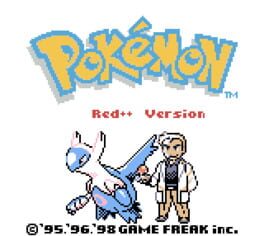
Pokémon Red++ is a heavily enhanced version of Pokémon Red that fixes many of Generation 1’s famous bugs while adding full color, the Physical/Special Split, Dark/Steel/Fairy typing, newer Pokémon, modernized moves, breeding, shiny Pokémon, an offline Wonder Trade-style system, improved Trainer AI, new areas, and a large collection of quality-of-life improvements.
Installing it safely is straightforward once you understand one critical distinction:
Pokémon Red++ v3 is the finished, playable release.
Pokémon Red++ v4 is currently an on-hold work in progress and is not playable.
The developer’s current v4 repository explicitly says its code is for an upcoming version and tells players looking for a playable game to use the archived Red++ v3 repository instead. The v3 repository describes itself as complete and no longer being updated.
For a normal installation, the basic process is:
Clean Pokémon Red + official Red++ v3 IPS patch = Pokémon Red++
Rom Professor does not provide, host, or link to copyrighted Pokémon Red ROM files or pre-patched Red++ ROMs. You need to provide your own legally obtained clean Pokémon Red ROM and apply the fan-made Red++ patch yourself.
What You Need Before Installing Pokémon Red++
You need:
- A clean English Pokémon Red ROM
- One of the official Pokémon Red++ v3 IPS patches
- An IPS-compatible patching tool
- A Game Boy/Game Boy Color emulator
- A way to extract files if necessary
- A safe backup of your clean Pokémon Red ROM
- A safe location for your Red++ battery save
The official v3 repository provides four patch options:
| Red++ v3 Patch | Difficulty | Graphics |
|---|---|---|
| Normal | Standard Red++ level curve | Normal |
| Hard | Harder level curve | Normal |
| Normal Snowy | Standard Red++ level curve | Snow-themed |
| Hard Snowy | Harder level curve | Snow-themed |
The archived repository contains these exact patch files:
rpp v3 normal.ipsrpp v3 hard.ipsrpp v3 normal snowy.ipsrpp v3 hard snowy.ips
For most first-time players:
Use rpp v3 normal.ips.
Hard Mode changes the level curve. The developer says that is the defining difference between the Normal and Hard builds.
What Is the Latest Playable Version of Pokémon Red++?
The latest completed playable version is:
Pokémon Red++ v3
The developer archived the v3 repository on January 25, 2025 and describes it as:
- Complete
- No longer updated
- The playable version of Red++
There is a newer development project called:
Pokémon Red++ v4
but that repository explicitly says:
the current v4 code is a work in progress and is not playable.
It also describes the project as:
ON-HOLD, WIP
and directs anyone who wants the playable v3 release to the archived repository instead.
So in 2026:
Do not try to install v4 as your normal Red++ game.
Unless development resumes and an actual v4 release is published, use v3.
For future changes, see our Pokémon Red++ latest version guide.
Is Pokémon Red++ Complete?
Yes—v3 is complete.
The archived v3 repository explicitly calls the game complete and says it is no longer being updated.
There is an important caveat, though.
Red++ v3 does not contain every idea that was later planned for v4.
For example, the v3 FAQ says:
- Johto is not available in v3
- Dive is not available
- Those larger additions were intended for v4
That does not make v3 an unfinished demo.
It means v3 is the completed version of the older Red++ design, while v4 was intended to be a much larger successor.
Do Not Confuse Red++ v3 and Red++ v4
This is probably the single most important thing in this entire installation guide.
If you search GitHub for Pokémon Red++, the most obvious repository is:
JustRegularLuna/RedPlusPlus
That is the v4 development repository.
Its feature list talks about enormous additions such as:
- Day and night
- 253 Pokémon
- Pre-GSC Johto
- Orange Islands areas
- Battle Tower
- Bug Catching Contest
- Berry Trees
- Optional Abilities
- Optional Natures
- Nuzlocke Mode
- Hard Mode
Those are v4 development goals/features, not the feature list of the completed v3 game you are installing.
The v4 repository itself makes this distinction explicit and directs players to the old v3 repository for the playable release.
Red++ Version Comparison
| Version | Status | Should You Install It? |
|---|---|---|
| Red++ v3 | Complete | Yes |
| Red++ v4 | On hold / WIP / not playable | No, unless developing from source |
This article covers:
Pokémon Red++ v3.
What Base ROM Does Pokémon Red++ Use?
Red++ v3 is based on the standard English:
Pokémon Red Version
The Red++ v3 repository says its IPS patches should be applied to a:
normal Red Version ROM.
The standard English Pokémon Red base is commonly identified as:
Pokemon Red (UE) [S][!].gb
with SHA-1:
ea9bcae617fdf159b045185467ae58b2e4a48b9a
The pret Pokémon Red disassembly reproduces and documents that exact ROM.
Red++ Base ROM Table
| Requirement | Correct Value |
|---|---|
| Base Game | Pokémon Red |
| Region | English USA/Europe |
| Common Name | Pokémon Red (UE) [S][!] |
| SHA-1 | ea9bcae617fdf159b045185467ae58b2e4a48b9a |
| Patch Format | IPS |
| Playable Red++ Version | v3 |
| Clean ROM Required | Yes |
If your patch fails, checking the SHA-1 is far more useful than checking the filename.
A file can be renamed:
Pokemon Red.gb
without actually containing the correct Pokémon Red data.
Can You Use Pokémon Blue as the Base?
No.
The Red++ repository says to apply the patch to:
Pokémon Red Version.
Do not use:
- Pokémon Blue
- Pokémon Yellow
- Japanese Pokémon Red
- Pokémon FireRed
- Pokémon Red++
- Pokémon Red DX
- Shin Pokémon Red
- PureRed
- Red++
- Another modified Red ROM
Start with clean English Pokémon Red.
Where to Get the Official Pokémon Red++ Patch
The safest source is the developer’s archived Red++ v3 GitHub repository.
Pokémon Red++ v3 official archive
The repository itself links to its patches directory and tells players:
- Download an IPS patch
- Apply it to a normal Pokémon Red ROM
- Choose whichever Red++ variant you want
The official patch folder contains all four finished v3 variants.
Official Red++ v3 patch folder
You do not need to download a pre-patched .gbc from a ROM site.
You also do not need to compile the source code simply to play v3.
You Do Not Need to Compile Red++ From Source
The GitHub repository contains source code, build instructions, and an INSTALL.md.
Those instructions are primarily for people who want to:
- Build the ROM themselves
- Modify Red++
- Use Red++ as the basis for another hack
- Work with the source code
The install document discusses:
- RGBDS
- Windows Subsystem for Linux
- Linux commands
- Compilation
Normal players can ignore all of that.
The v3 README already provides ready-to-use IPS patches.
For ordinary installation:
download IPS → patch Pokémon Red → play.
Which Red++ Patch Should You Choose?
There are four.
Red++ v3 Normal
Filename:
rpp v3 normal.ips
This is the standard version.
Choose this if:
- This is your first Red++ playthrough
- You want the intended normal difficulty
- You want the normal visual presentation
This is my default recommendation.
Red++ v3 Hard
Filename:
rpp v3 hard.ips
This changes the level curve to make the game harder.
The official README says that the level curve is the difference between the Normal and Hard versions.
Choose this if you already know you want the higher-difficulty version.
Red++ v3 Normal Snowy
Filename:
rpp v3 normal snowy.ips
This combines the standard level curve with the optional snowy graphical theme.
Red++ v3 Hard Snowy
Filename:
rpp v3 hard snowy.ips
This combines:
- Hard Mode level curve
- Snow-themed graphics
For most readers:
Normal is the safest starting point.
How to Patch Pokémon Red++
Red++ v3 uses:
IPS
That makes it easy to patch with tools such as:
- Rom Patcher JS
- Lunar IPS
- Floating IPS
A browser-based tool is simplest for most people.
Step 1: Download the Red++ v3 Patch
Open the official archived patch directory.
Choose one of:
- Normal
- Hard
- Normal Snowy
- Hard Snowy
For this guide, assume you selected:
rpp v3 normal.ips
Step 2: Prepare Your Clean Pokémon Red ROM
Locate your legally obtained Pokémon Red ROM.
It should be the English USA/Europe release.
Expected SHA-1:
ea9bcae617fdf159b045185467ae58b2e4a48b9a
If the file is inside:
.zip
.7z
or:
.rar
extract it first.
You want the actual:
.gb
file.
Step 3: Keep a Clean Backup
Before patching, copy the ROM.
For example:
Pokemon Red CLEAN.gb
Keep that file permanently.
Use a copy for Red++.
That way you can always:
- Repatch
- Try Hard Mode
- Try Snowy Mode
- Install another Red hack
without searching for your clean base again.
Step 4: Open an IPS Patcher
Open Rom Patcher JS or another IPS-compatible patcher.
You should see fields for:
ROM file
and:
Patch file
Step 5: Select Pokémon Red
Under the ROM field, select your clean:
Pokemon Red.gb
Do not select:
- Pokémon Blue
- Red++ v3
- A
.sav - An IPS file
- A ZIP archive
Step 6: Select the Red++ IPS
Under Patch, select:
rpp v3 normal.ips
or whichever official variant you chose.
Step 7: Apply the Patch
Choose:
Apply Patch
The patcher should generate a new playable ROM.
Because Red++ adds Game Boy Color-style functionality, you may see the finished file handled as:
.gbc
rather than a simple vanilla .gb.
The official Red++ source itself builds its Normal release as:
pokered.gbc
and its Hard release as:
pokeblue.gbc.
Step 8: Rename the Finished ROM
Give it an obvious filename.
For example:
Pokemon Red Plus Plus v3.gbc
or:
Pokemon Red++ v3 Normal.gbc
If you intend to keep multiple versions:
Pokemon Red++ v3 Normal.gbc
Pokemon Red++ v3 Hard.gbc
Pokemon Red++ v3 Snowy.gbc
is much less confusing.
Step 9: Open the Patched ROM
Launch your emulator.
Open the new Red++ file.
Do not reopen your clean Pokémon Red ROM.
Step 10: Make a Test Save
Before starting a serious playthrough:
- Start Red++.
- Make a normal in-game save.
- Close the emulator completely.
- Reopen Red++.
- Confirm Continue appears.
- Load the game.
- Save again.
This makes sure your emulator is properly writing battery saves.
Suggested screenshot: Capture the patcher with clean Pokémon Red in the ROM field and rpp v3 normal.ips in the patch field. Do not show personal folder names or unrelated files.
How to Verify That Red++ Patched Correctly
The Red++ repository provides MD5 hashes for its main compiled v3 builds.
The final builds are listed as:
Normal
3d45c1ee9abd5738df46d2bdda8b57dc
Hard
50927e843568814f7ed45ec4f944bd8b
Red++ v3 Verification Table
| Build | MD5 |
|---|---|
| Normal | 3d45c1ee9abd5738df46d2bdda8b57dc |
| Hard | 50927e843568814f7ed45ec4f944bd8b |
The repository does not list equivalent hashes in that file for the Snowy builds, so do not assume those two hashes apply to the snowy variants.
If you patched Normal or Hard and your finished MD5 matches the official build:
that is excellent confirmation that the ROM was created correctly.
What Changes Should You See After Installing Red++?
Red++ v3 should look very different from ordinary Pokémon Red almost immediately.
The official v3 feature list includes:
- Full color
- Red or Leaf player selection
- Running Shoes
- Faster Surf
- Faster Bicycle
- Updated graphics
- Pokémon Crystal’s audio engine
- Physical/Special Split
- Dark type
- Steel type
- Fairy type
- Additional Pokémon
- New moves
- Modernized movesets
- New evolution methods
- Berry Trees
- Trainer names
- Gen 6-style EXP Share functionality
- BW/BW2-style Repel behavior
- Larger item storage
- Headbutt
- New Kanto areas
- Breeding
- Offline Wonder Trade
- Better Trainer AI
- Shinies
- Chain Fishing
If your game looks exactly like ordinary Pokémon Red:
you probably opened the wrong ROM.
How Many Pokémon Are in Red++ v3?
The completed v3 README says:
208 Pokémon
are included and all 208 can be obtained without another player or relying on Wonder Trade.
This is another place where v3 and v4 are frequently confused.
The v4 development feature list refers to:
253 Pokémon.
That number does not describe the completed v3 release.
For the game you are installing here:
208 Pokémon.
Does Red++ v3 Have Johto?
No.
The v3 FAQ explicitly says:
Red++ v3 only has Kanto.
Johto was planned for v4.
This matters because the question-bank source notes reference Red++ development material discussing a Pre-GSC Johto postgame.
That material applies to the v4 development project, not the completed v3 release.
For the currently playable Red++:
do not expect a full Johto region.
Best Emulator for Pokémon Red++ on Windows
The official Red++ repository does not prescribe one specific emulator, so these recommendations are compatibility-oriented rather than an official developer requirement.
For Windows, good choices include:
BGB
SameBoy
and:
mGBA
Red++ v3 is a heavily modified Pokémon Red game with full-color Game Boy Color functionality, so using an accurate GB/GBC emulator is preferable to relying on a very old emulator.
My Windows Recommendation
Start with:
SameBoy
or:
BGB
If you already use mGBA for other Pokémon hacks:
mGBA is also a sensible option.
Best Emulator for Pokémon Red++ on Mac
For macOS:
SameBoy
is an excellent option.
mGBA is also convenient if you already use it for both GBC and GBA hacks.
The setup is simple:
- Open the emulator.
- Load your patched Red++
.gbc. - Configure controls.
- Save normally.
- Restart.
- Verify your save.
Can You Play Pokémon Red++ on Android?
Yes.
Use an accurate Game Boy/Game Boy Color emulator.
Good choices include:
- RetroArch with SameBoy
- RetroArch with Gambatte
- Other established GB/GBC emulators
Red++ does not require an emulator specifically branded for ROM hacks.
It just needs accurate support for the hardware behavior its modified engine expects.
Can You Play Pokémon Red++ on iPhone?
Yes.
Community players have successfully played Red++ using Delta on iPhone, including shiny hunting in the game.
The process is:
- Patch Red++ first.
- Save the finished
.gbcto Files. - Open Delta.
- Import the game.
- Launch Red++.
- Make a normal in-game save.
Do not import:
rpp v3 normal.ips
into Delta.
Delta needs the finished game.
Best Emulator Settings for Pokémon Red++
Red++ normally does not require complicated configuration.
A good starting setup is:
| Setting | Recommendation |
|---|---|
| System | Game Boy Color |
| Windows | SameBoy, BGB, or mGBA |
| Mac | SameBoy or mGBA |
| Android | Accurate GB/GBC emulator |
| iPhone/iPad | Delta |
| Save type | Automatic/default |
| Normal in-game saves | Yes |
| Save states | Secondary only |
| Fast-forward | Optional |
| RTC | Not required for v3’s core game |
| Save backups | Recommended |
Use Game Boy Color Mode
Red++ v3 includes:
full color.
If your emulator allows you to choose a hardware model:
use:
Game Boy Color
rather than forcing monochrome DMG mode.
Does Red++ v3 Have Day and Night?
This is another v3/v4 trap.
The current v4 feature list contains:
Day and Night.
That does not mean the completed v3 release has the same v4 RTC-driven system.
The old v3 development TODO even listed:
Real-Time Clock, with Day and Night
as planned future work.
Therefore:
Do not choose an emulator based on the assumption that Red++ v3 requires the v4 day/night RTC system.
For the completed v3 release, normal save support is the main requirement.
Use Normal In-Game Saves
Save states are convenient but should not be your only copy of your progress.
Use Pokémon’s normal:
SAVE
option.
The resulting battery save is what you want if you later:
- Move to another emulator
- Move to another device
- Back up your playthrough
- Switch between desktop and mobile
- Test another Red++ build
Save states are much more tightly tied to one emulator.
Can You Update Pokémon Red++ v3?
There is currently no newer playable v3 release to update to.
The v3 project is:
complete and archived.
The supposed “next version,” v4, is:
- On hold
- A separate major rewrite
- Not currently playable
That means an ordinary Red++ player in 2026 does not need to maintain a patch-update workflow the way Radical Red or R.O.W.E. players do.
Install v3 and play.
Will a Red++ v3 Save Work in v4?
Do not assume it will.
The v4 project is not simply a tiny v3 bug-fix patch.
The developer says v4 is based on a heavily modified Polished Crystal engine rather than the Red-engine foundation used by previous Red++ versions.
That is a major technical change.
I could not find an official statement guaranteeing v3 save compatibility with an eventual v4 release.
Therefore:
Keep your v3 save, but assume nothing about v4 migration until the developer publishes actual release instructions.
Can You Switch From Normal to Hard Mid-Save?
The official repository says Normal and Hard differ in level curve.
However, I did not find an official statement explicitly guaranteeing that a Normal battery save can safely be moved into Hard Mode or vice versa.
Because the builds contain different Trainer/level data:
I recommend keeping each version on its own save unless you have a backup.
If you want to experiment:
- Back up the
.sav. - Keep the old ROM.
- Test a copy of the save.
- Do not overwrite the only working backup.
Common Pokémon Red++ Installation Problems
“I found Red++ v4. Is that the latest version?”
It is the newest development branch, but it is not a playable release.
The developer explicitly says:
the v4 repository is WIP and not playable.
Use the completed v3 archive instead.
“The Red++ v4 GitHub page has no patch”
That is because it is a development source repository, not a normal playable release.
For Red++ v3, the official archive contains ready-to-use IPS files.
“GitHub tells me to install WSL and RGBDS”
You are reading:
source-code build instructions.
You do not need to compile v3 simply to play.
Use one of the official IPS files.
“Which Red++ v3 patch should I use?”
For a normal first playthrough:
rpp v3 normal.ips
Use Hard only if you specifically want the higher level curve.
Use Snowy only if you specifically want the alternate graphical theme.
“The IPS patch won’t apply”
Check your Pokémon Red ROM.
Expected English Red SHA-1:
ea9bcae617fdf159b045185467ae58b2e4a48b9a
If your hash differs, possible causes include:
- Wrong region
- Pokémon Blue
- Modified Red
- Another Red ROM hack
- Corrupt ROM
- Previously patched ROM
Start from clean Pokémon Red.
“Can I patch Red++ onto Pokémon Blue?”
No.
The official Red++ v3 instructions say to use:
Red Version.
“My emulator won’t open the IPS patch”
That is normal.
.ips is a patch format.
You need to apply it to Pokémon Red.
Then open the finished .gbc.
“Can I rename .ips to .gbc?”
No.
Renaming:
rpp v3 normal.ips
to:
Pokemon Red++.gbc
does not patch the game.
It only changes the filename.
“Normal Pokémon Red starts”
You opened the clean ROM instead of the patched output.
Keep files named clearly:
Pokemon Red CLEAN.gb
Pokemon Red++ v3.gbc
Then open the second one.
“The game is black and white instead of full color”
Red++ v3 includes full-color graphics.
Check whether your emulator is forcing:
original Game Boy / DMG mode
instead of Game Boy Color mode.
Try an accurate GBC emulator such as SameBoy or BGB.
“How can I verify the patch worked?”
For the standard compiled builds, the official Red++ v3 repository lists:
Normal MD5
3d45c1ee9abd5738df46d2bdda8b57dc
Hard MD5
50927e843568814f7ed45ec4f944bd8b
If your matching build has that MD5, your result matches the official source build.
“My Red++ has 208 Pokémon, but a guide says 253”
You are looking at information for two different versions.
Red++ v3:
208 Pokémon.
Red++ v4 development documentation:
253 Pokémon planned/included in the development design.
The playable game is v3.
“I can’t go to Johto”
That is normal in v3.
The official v3 FAQ says:
there is only Kanto in v3.
Johto was part of v4 development plans.
“I can’t find Dive”
Again, normal.
The v3 FAQ says Dive is not implemented and was intended for v4.
“My save disappeared after renaming the ROM”
Many emulators associate saves by filename.
For example:
Pokemon Red++.gbc
Pokemon Red++.sav
usually belong together.
If you rename only the ROM, your emulator may create a fresh save.
Find and back up the original .sav before starting another game.
“Can I transfer the save to another emulator?”
Usually, yes, if both emulators use normal battery-save formats.
Export or locate your .sav.
Back it up before converting or importing it.
“My save doesn’t work on Analogue Pocket”
Red++ has had platform-specific patch issues on .pocket conversions in the past.
A 2022 Analogue Pocket issue involved Red++’s mapper/save configuration; corrected Pocket patches fixed saving, and affected players needed to repatch their Pocket version.
That issue relates to the Pocket conversion, not the normal v3 IPS ROM itself.
If you are playing standard Red++ in an ordinary GB/GBC emulator, do not apply Analogue-specific fixes.
Is Red++ a Difficulty Hack?
Not primarily.
The Normal build is an enhancement/remaster-style hack.
The project focuses on:
- Fixing Gen 1 bugs
- Modernizing mechanics
- Adding Pokémon
- Improving graphics
- Adding quality-of-life features
- Expanding content
The optional Hard build exists for players who want a different level curve.
If you want the intended standard experience:
choose Normal.
Does Red++ Have the Physical/Special Split?
Yes.
The completed v3 feature list explicitly includes:
Physical/Special Split.
This is one of the biggest mechanical differences from vanilla Pokémon Red.
Does Red++ Have Fairy Type?
Yes.
Red++ v3 includes:
- Dark
- Steel
- Fairy
and the v3 FAQ says the type effectiveness chart matches Generation 6.
Does Red++ Have Shiny Pokémon?
Yes.
The official v3 feature list says wild shiny odds are:
1/1024
and also includes chain fishing for shinies.
The v3 FAQ additionally identifies the Magikarp sold at the Mt. Moon Pokémon Center as an event shiny.
Does Red++ Have Wonder Trade?
Yes.
Red++ v3 includes an:
offline Wonder Trade
system.
The developer’s FAQ says every non-legendary Pokémon can potentially appear, with restrictions based on what Pokémon can legally exist at the level you offer.
How to Verify That Pokémon Red++ Installed Correctly
There are several easy checks.
Check the Game Presentation
Red++ v3 includes:
- Full color
- Updated graphics
- Red/Leaf gender selection
- Pokémon Crystal audio engine
If everything looks like ordinary Pokémon Red:
you probably opened the wrong file.
Check the Mechanics
You should eventually see features such as:
- Running Shoes
- Physical/Special Split
- Fairy typing
- New Pokémon
- New evolution methods
- Berry Trees
- Wonder Trade
- Shinies
- Modernized moves
Check the MD5
For standard v3:
3d45c1ee9abd5738df46d2bdda8b57dc
For Hard:
50927e843568814f7ed45ec4f944bd8b
Test Saving
- Save normally.
- Close the emulator.
- Reopen Red++.
- Confirm Continue appears.
- Load the save.
- Save again.
If the game is clearly Red++, the build checksum matches where applicable, and your battery save survives a complete restart:
your installation is ready.
Pokémon Red++ Installation FAQ
What is the latest playable version of Pokémon Red++?
Pokémon Red++ v3.
The developer describes v3 as complete and no longer being updated.
What is Pokémon Red++ v4?
It is a major successor/rewrite currently marked:
ON-HOLD, WIP
and:
not playable.
Do not install v4 expecting a finished game.
Is Pokémon Red++ complete?
Yes.
Version 3 is considered complete.
What ROM does Pokémon Red++ use?
Use clean English:
Pokémon Red Version USA/Europe
with SHA-1:
ea9bcae617fdf159b045185467ae58b2e4a48b9a
What patch format does Red++ v3 use?
IPS.
The official repository provides four IPS files.
What are the four versions?
- Normal
- Hard
- Normal Snowy
- Hard Snowy
The Hard variants use the harder level curve.
Which version should I play?
For your first playthrough:
Normal.
Do I need to compile Red++?
No.
Ready-to-use IPS patches are available in the official v3 archive.
Compilation instructions are for developers or players who specifically want to build the source themselves.
Can I use Rom Patcher JS?
Yes.
Red++ uses a standard IPS patch, so a multi-format patcher that supports IPS is suitable.
Can I use Lunar IPS?
Yes.
Lunar IPS supports the IPS format used by Red++ v3.
Can I use Pokémon Blue as the base?
No.
Use Pokémon Red.
What emulator should I use?
Use an accurate Game Boy Color emulator.
Good choices include:
- SameBoy
- BGB
- mGBA
The official project does not mandate one particular emulator for ordinary v3 play.
Can I play Red++ on Android?
Yes.
Use an accurate Game Boy/Game Boy Color emulator.
Can I play Red++ on iPhone?
Yes.
Community players have successfully run Red++ in Delta.
Does Red++ have all Pokémon?
Red++ v3 contains:
208 Pokémon
and the developer says all 208 are obtainable without another player.
Why do some sites say 253 Pokémon?
That figure comes from the v4 development branch.
The playable v3 release contains 208.
Does Red++ have Johto?
Not in v3.
The official v3 FAQ says only Kanto is available.
Does Red++ have the Physical/Special Split?
Yes.
Does Red++ have Fairy type?
Yes.
Dark, Steel, and Fairy are present.
Does Red++ have shiny Pokémon?
Yes.
The v3 feature list gives normal wild shinies a 1/1024 chance and includes chain fishing.
Can I update Red++?
There is no newer completed v3 release to install.
V3 is archived and complete.
V4 is not currently playable.
Will my v3 save work in v4?
There is no official guarantee I could verify.
Because v4 is a substantial engine rewrite based on a modified Polished Crystal engine, do not assume save compatibility until a future release specifically documents it.
Where should I go after installing Pokémon Red++?
Once the game is working, read our Pokémon Red++ beginner guide.
Red++ still uses Kanto and Pokémon Red’s recognizable structure, but the mechanics underneath it are substantially different. Pokémon availability, evolutions, movesets, Physical/Special categories, types, Trainer AI, shiny mechanics, breeding, Berry Trees, Wonder Trade, new areas, and numerous quality-of-life systems all change how you should approach a playthrough.
For version confusion, especially the differences between completed v3 and unfinished v4, also see our Pokémon Red++ latest version guide.
Suggested article screenshots: Use your own screenshot of the Red++ v3 title/opening screen and a screenshot of the patcher with rpp v3 normal.ips selected. The question-bank brief specifically recommends a title screen, patching screen, or official project-page screenshot rather than artwork from a random pre-patched ROM website.




