How Do I Install Pokémon Shin Red / Blue / Green?
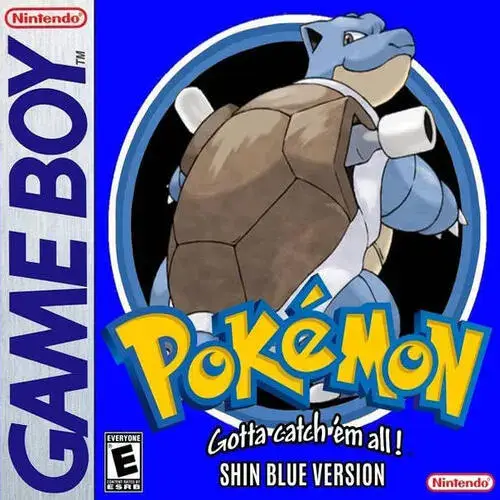
Pokémon Shin Red / Blue / Green is a mostly-vanilla enhancement of the original Generation 1 Pokémon games built around bug fixes, smarter Trainer AI, improved Game Boy Color presentation, and quality-of-life features without replacing Kanto with a completely different game.
Installing it is straightforward once you understand which Shin patch belongs to which original ROM.
The most important rule is:
Shin Red uses a clean USA Pokémon Red ROM.
Shin Blue and Shin Green use a clean USA Pokémon Blue ROM.
That second point surprises a lot of players. You do not need a Japanese Pokémon Green ROM to play Shin Pokémon Green. The official project builds the Green-style version from the USA Pokémon Blue ROM and changes graphics, Pokédex text, Cerulean Cave, and other details to recreate the original Japanese Green experience in English.
As of August 29, 2026, the latest full tagged release is Shin Pokémon v1.25.0. However, the project also publishes tiny post-release “stealth patches” without changing the main version number. The current BPS files in the repository are dated March 18, 2026 and use filenames such as shin_pokemon_red_v1.25.0.260318.bps.
So the most precise way to describe the current version is:
Shin Pokémon v1.25.0, current patch build 2026-03-18.
Rom Professor does not provide, host, or link to copyrighted Pokémon Red or Pokémon Blue ROM files or pre-patched Shin Pokémon ROMs. You need to provide your own legally obtained clean base ROM and apply the official BPS patch yourself.
What You Need Before Installing Pokémon Shin Red / Blue / Green
You need:
- A clean English USA Pokémon Red or Pokémon Blue ROM
- The official Shin Pokémon BPS patch for the version you want
- A BPS-compatible patching tool
- An accurate Game Boy/Game Boy Color emulator
- A way to extract files if necessary
- A safe copy of your original base ROM
- A backup location for your save
The basic process is:
Pokémon Red or Blue + matching Shin Pokémon BPS patch = playable Shin Pokémon ROM
The resulting game is what you open in your emulator.
The .bps file itself is not playable.
Which Shin Pokémon Version Should I Install?
The project currently supports several closely related builds.
The main choices are:
- Shin Pokémon Red
- Shin Pokémon Blue
- Shin Pokémon Green
- Shin Pokémon Red with original back sprites
- Shin Pokémon Blue with original back sprites
There are also English builds designed to recreate aspects of:
- Japanese Red
- Japanese Blue
The project repository currently includes patch files such as:
shin_pokemon_red_v1.25.0.260318.bpsshin_pokemon_red_origback_v1.25.0.260318.bpsshin_pokemon_blue_v1.25.0.260318.bpsshin_pokemon_blue_origback_v1.25.0.260318.bpsshin_pokemon_green_v1.25.0.260318.bpsshin_pokemon_redjp_v1.25.0.260318.bpsshin_pokemon_bluejp_v1.25.0.260318.bpsshin_pokemon_bluejp_origback_v1.25.0.260318.bps
For most first-time players:
Choose Shin Pokémon Red or Shin Pokémon Blue.
Pick Green if you specifically want the project’s English recreation of the original Japanese Pokémon Green presentation.
What Is the Latest Version of Pokémon Shin Red / Blue / Green?
The official GitHub Releases page identifies:
v1.25.0
as the latest full release.
Version 1.25.0 added and changed features including:
- Game Boy Printer support
- Improved Game Boy Color overworld colorization
- Additional music functionality from Pokémon Yellow
- Fixed trading music
- Additional bug fixes
- Better Trainer AI options
- More Trainer team variety
- Improvements to New Game+ behavior
- Additional quality-of-life functions
What Are the 2026 “Stealth Patches”?
Shin Pokémon receives extremely small updates that the developer does not consider large enough to justify incrementing the main version number.
The README calls these:
dev updates or stealth patches.
Recent fixes include:
- January 6, 2026 — battle-menu visual fixes
- January 12, 2026 — Cinnabar cloning-price fix
- February 7, 2026 — another cloning-price correction
- March 12, 2026 — Gen 2 Time Capsule / double-speed CPU data-corruption fix
- March 18, 2026 — small Trainer AI item-use adjustments
That is why the current files can still say:
v1.25.0
while also ending with:
260318
The date indicates the current stealth-patch build.
For a new installation, use the current BPS files in the repository, not an old v1.25.0 patch saved from months earlier.
What Base ROM Does Shin Pokémon Red Use?
Shin Pokémon Red uses the standard English USA Pokémon Red ROM.
The official project gives these checksums:
SHA-1
EA9BCAE617FDF159B045185467AE58B2E4A48B9A
CRC32
9F7FDD53
That same Red base is also used for:
- Shin Pokémon Red
- Shin Pokémon Red
_origback - Shin Pokémon Red-JP
The Red-JP name does not mean you need a Japanese Red ROM.
It is a reconstruction-style build created from the USA Red base.
What Base ROM Does Shin Pokémon Blue Use?
Shin Pokémon Blue uses the standard English USA Pokémon Blue ROM.
Official checksums:
SHA-1
D7037C83E1AE5B39BDE3C30787637BA1D4C48CE2
CRC32
D6DA8A1A
The USA Blue base is used for:
- Shin Pokémon Blue
- Shin Pokémon Blue
_origback - Shin Pokémon Green
- Shin Pokémon Blue-JP
- Shin Pokémon Blue-JP
_origback
What Base ROM Does Shin Pokémon Green Use?
This is the confusing one.
Shin Pokémon Green uses USA Pokémon Blue as its base.
Do not use:
- Japanese Pokémon Green
- USA Pokémon Red
- A translated Green ROM
- Another Green hack
The official project specifically says all Blue and Green patches are intended for the USA Blue ROM.
Why Is Green Based on Blue?
The goal is not simply to translate the Japanese Green cartridge byte-for-byte.
Instead, Shin Green builds an English recreation using the established USA Blue engine while restoring or adapting things associated with the original Japanese release.
The project changes things such as:
- Graphics
- Cerulean Cave layout
- Some text
- Pokédex entries
- Metric measurements
The Pokédex text is adapted from later official English translations where appropriate.
This gives English-speaking players something resembling a polished official English Green release that never actually existed.
Shin Red / Blue / Green Base-ROM Table
| Shin Version | Base ROM | SHA-1 |
|---|---|---|
| Shin Red | USA Pokémon Red | EA9BCAE617FDF159B045185467AE58B2E4A48B9A |
Shin Red _origback | USA Pokémon Red | EA9BCAE617FDF159B045185467AE58B2E4A48B9A |
| Shin Red-JP | USA Pokémon Red | EA9BCAE617FDF159B045185467AE58B2E4A48B9A |
| Shin Blue | USA Pokémon Blue | D7037C83E1AE5B39BDE3C30787637BA1D4C48CE2 |
Shin Blue _origback | USA Pokémon Blue | D7037C83E1AE5B39BDE3C30787637BA1D4C48CE2 |
| Shin Green | USA Pokémon Blue | D7037C83E1AE5B39BDE3C30787637BA1D4C48CE2 |
| Shin Blue-JP | USA Pokémon Blue | D7037C83E1AE5B39BDE3C30787637BA1D4C48CE2 |
These mappings come directly from the official patch instructions.
What Are the _origback Patches?
The standard Shin Pokémon releases include updated Pokémon back sprites.
If you prefer the original Generation 1 back sprites, choose the patch whose filename includes:
_origback
The official project describes those as alternate patches that retain the original back sprites.
For example:
Updated backs
shin_pokemon_red_v1.25.0.260318.bps
Original backs
shin_pokemon_red_origback_v1.25.0.260318.bps
This is mostly a visual preference.
For most players, I recommend the normal patch without _origback.
Where to Get the Official Shin Pokémon Patch
The best source is the project’s official GitHub repository.
Official Shin Pokémon GitHub repository
The repository contains:
- Current BPS patches
- Changelogs
- New-player documentation
- Source code
- Screenshots
- Trainer information
- Technical notes
- Save-update instructions
The current patch directory is:
patches_and_info
and contains the latest public BPS files.
The project also links from its README to:
- PokéCommunity
- Hackdex
- Rom Hack Plaza
- Community resources
For installation, I recommend getting the BPS file directly from the official GitHub repository.
Do Not Download a Pre-Patched Shin Pokémon ROM
Avoid searching for:
Shin Pokemon Red ROM download
Shin Pokemon Green prepatched
or similar phrases and grabbing a complete .gb or .gbc file from an unrelated site.
Patching the official BPS yourself gives you much more certainty about:
- Which Shin build you installed
- Which version you installed
- Which stealth-update date you have
- Whether you selected Red, Blue, or Green
- Whether you selected
_origback - Whether the correct base ROM was used
It also avoids redistributing Nintendo’s copyrighted Pokémon Red or Blue game data.
What Patch Format Does Shin Pokémon Use?
Current Shin Pokémon releases use:
BPS
The official README explicitly says the project provides BPS files intended for standard patching tools, emulators, or accessories that support BPS.
BPS is useful because it can validate the source ROM.
If you try to use the wrong base ROM, a proper patcher should refuse to create the game rather than silently producing corrupted output.
That is especially valuable for Shin Pokémon because:
- Red uses Red
- Blue uses Blue
- Green uses Blue
- Red-JP uses Red
- Blue-JP uses Blue
How to Patch Pokémon Shin Red / Blue / Green
For most players, use a modern browser patcher with BPS support.
Rom Patcher JS is one common option.
Step 1: Decide Which Shin Version You Want
Choose:
- Red
- Blue
- Green
For a standard playthrough, do not select _origback unless you specifically want the original back sprites.
Step 2: Download the Current BPS Patch
Open the official GitHub repository.
Go to:
patches_and_info
Choose the patch matching your desired version.
As of August 29, 2026, the current master patch files are dated:
260318
meaning March 18, 2026.
Examples:
shin_pokemon_red_v1.25.0.260318.bps
shin_pokemon_blue_v1.25.0.260318.bps
shin_pokemon_green_v1.25.0.260318.bps
Step 3: Prepare the Correct Clean Base ROM
For Shin Red:
use clean USA Pokémon Red.
For Shin Blue:
use clean USA Pokémon Blue.
For Shin Green:
use clean USA Pokémon Blue.
Do not guess.
Verify the checksum if necessary.
Step 4: Open Your BPS Patcher
Load a BPS-compatible patching tool.
You should see something similar to:
ROM file
and:
Patch file
Step 5: Select the Base ROM
Examples:
For Shin Red:
ROM: Pokémon Red
For Shin Green:
ROM: Pokémon Blue
This is the most common Green installation mistake.
Step 6: Select the Shin Pokémon BPS
Select your downloaded .bps.
For example:
shin_pokemon_green_v1.25.0.260318.bps
Step 7: Let the Patcher Validate the ROM
BPS includes source validation.
If the patcher reports that the ROM does not match:
do not force it.
Your base is probably wrong or modified.
For Red, verify:
SHA-1 EA9BCAE617FDF159B045185467AE58B2E4A48B9A
For Blue/Green, verify:
SHA-1 D7037C83E1AE5B39BDE3C30787637BA1D4C48CE2
Step 8: Apply the Patch
Select:
Apply Patch
The patcher creates a finished game ROM.
Save that output.
Step 9: Rename the Game Clearly
Useful filenames include:
Pokemon Shin Red 1.25.0.gb
Pokemon Shin Blue 1.25.0.gb
Pokemon Shin Green 1.25.0.gb
I recommend keeping the color/version in the filename.
If you install several builds, you do not want to accidentally associate a Blue save with your Green ROM later.
Step 10: Open the Finished ROM in an Accurate Emulator
Launch your emulator.
Open the finished game.
Do not open the .bps patch.
Do not reopen vanilla Pokémon Red or Blue.
Step 11: Make a Normal Test Save
Start a new game.
Save normally.
Then:
- Close the emulator completely.
- Restart it.
- Open Shin Pokémon.
- Confirm Continue appears.
- Load the save.
- Save again.
That verifies your emulator’s battery-save behavior before you invest hours in the game.
Suggested screenshot: Capture the patcher showing a clean Red or Blue base and the corresponding official Shin Pokémon BPS. A second useful screenshot would show the official GitHub patches_and_info folder with the current patch filenames.
Best Emulator for Pokémon Shin Red / Blue / Green
Shin Pokémon is unusually clear about emulator compatibility.
The project warns that inaccurate emulators can create bugs that do not exist on real Game Boy hardware.
Officially Preferred Emulator: BGB
The project’s supported standard is:
BGB
The developer says BGB is used because of its combination of accuracy and debugging features, and new builds are specifically tested using BGB 1.5.8 and verified on original hardware.
For Windows:
BGB is the safest choice.
Does mGBA Work With Shin Pokémon?
Yes.
The official compatibility notes specifically say:
mGBA works very well.
That makes mGBA a very convenient option if you already use it for other Pokémon ROM hacks.
One warning:
the project’s link-cable documentation says GBA-oriented emulators such as mGBA can have problems with some Gen 1/Gen 2 trading scenarios because GBA and GBC link protocols differ.
For normal single-player gameplay:
mGBA is fine.
For complicated link-cable experiments:
BGB or real GB/GBC hardware is preferable.
Can I Play Shin Pokémon on Android?
Yes.
The official project specifically recommends the:
Gambatte
or:
mGBA
cores in RetroArch for Android devices.
A good Android setup is:
- Install RetroArch.
- Use Gambatte or mGBA.
- Import the patched Shin Pokémon ROM.
- Make a normal in-game save.
- Restart once to verify it.
Can I Play Shin Pokémon on iPhone?
Yes.
The official compatibility section specifically lists:
Delta
for iOS devices.
The process is:
- Patch Shin Pokémon first.
- Save the finished ROM in Files.
- Import the finished ROM into Delta.
- Start playing.
- Make a normal battery save.
Do not import the BPS file itself.
Can I Play Shin Pokémon on 3DS?
Yes.
The project says the 3DS Virtual Console emulator may display an emulator-error message, but it is known to work correctly.
Shin Red and Blue can also work with Poké Transporter if configured correctly.
However, there is a special problem with Shin Green:
because Shin Green is built on the USA Blue ROM, using it as if it were the Virtual Console Pokémon Green product ID does not work correctly for Poké Transporter.
That is another reason to remember:
Shin Green is technically Blue-based.
Emulators You Should Avoid
The official project specifically identifies these as problematic:
- Goomba
- VisualBoyAdvance
- VBA-M
The reason is accuracy.
Shin Pokémon makes extensive engine-level fixes and enhancements. An inaccurate emulator can produce glitches the developer cannot reproduce on the hardware the game is actually designed around.
If something breaks:
test the same ROM in BGB before repatching.
Emulator Recommendation Table
| Platform | Recommended |
|---|---|
| Windows | BGB |
| Windows alternate | mGBA |
| macOS | mGBA or another accurate GB/GBC emulator |
| Android | RetroArch + Gambatte or mGBA |
| iPhone/iPad | Delta |
| 3DS | Virtual Console |
| Real hardware | Supported |
| Avoid | VBA, VBA-M, Goomba |
The platform-specific recommendations above are documented by the Shin Pokémon project.
Best Emulator Settings for Shin Pokémon
Shin Pokémon mostly works best when you leave emulator behavior accurate and close to hardware.
A good baseline:
| Setting | Recommendation |
|---|---|
| Hardware mode | Game Boy Color when using color features |
| Emulator accuracy | High |
| Save type | Automatic |
| Normal saves | Yes |
| Save states | Secondary only |
| Frameskip | Default/off |
| Fast-forward | Optional |
| GBC mode | Recommended |
| Emulator | BGB preferred |
| VBA/VBA-M | Avoid |
Why Game Boy Color Mode Is Worth Using
Shin Pokémon goes much farther with color than vanilla Red and Blue.
The project backports color functionality from Pokémon Yellow and adds an optional enhanced overworld color mode. It also colors attack animations by type when played in Game Boy Color mode.
Version 1.25.0 also added:
Enhanced GBC Color
to the extra options menu.
So although Shin Pokémon remains based on Generation 1:
playing in GBC mode gives you the intended modernized presentation.
What Makes Shin Pokémon Different From Vanilla Red and Blue?
Shin Pokémon is not trying to replace Generation 1.
It is essentially asking:
What if Red and Blue had received an extremely thorough official remaster that preserved their original rules and identity?
The project describes itself as a mostly-vanilla modification focused on:
- Engine bug fixes
- Oversight fixes
- Better Trainer AI
- Quality-of-life features
- Research-based corrections
- A cleaner version of the original games
More than 200 bugs, glitches, oversights, and text errors have been fixed.
The game also includes features such as:
- Improved Trainer AI
- Enhanced color
- Shinies
- Running
- Quick HM use
- Expanded item storage
- Item sorting
- Improved Itemfinder
- Buyable TMs
- Field-move slots
- Rematches
- Extra postgame Trainers
- New Game+
- Cinnabar genetic modification
- Nuzlocke mode
- Randomization options
For the complete feature breakdown, use our Pokémon Shin Red / Blue / Green beginner guide.
How to Update Shin Pokémon Without Losing Your Save
Shin Pokémon has a built-in process designed to make version updates safer.
The developer tracks the patch revision inside the save file. If the save’s version byte does not match the new ROM, the game automatically warps the player back to Pallet Town to reduce the chance of loading invalid map data.
Still, you should prepare the save properly before updating.
Step 1: Back Up Your Save
Locate the normal battery save.
It will usually end in:
.sav
Make a copy.
For example:
Pokemon Shin Red BACKUP.sav
Also keep your old ROM.
Do not make the new version your only working copy.
Step 2: Disable Special Options and NPC Toggles
The official update instructions say to deactivate special options and NPC toggles before moving an older save into a new patch.
The project includes a built-in:
Vanilla Options Reset
specifically for this purpose.
To activate it:
- Open the Start menu.
- Put the cursor on the top option, usually Pokédex.
- Hold Up so the cursor wraps to Exit.
- Continue holding Up.
- Hold Select.
- Press B.
- Listen for the confirmation jingle.
The project says this disables the special options in preparation for updating.
Step 3: Go to Outdoor Pallet Town
For maximum safety:
save outside in Pallet Town.
The official update section says this is the preferred place to leave an older save before loading it with a new Shin Pokémon build.
Do not simply save inside a random:
- Dungeon
- Gym
- House
- Changed map
- Special event area
Pallet Town minimizes the chance that map changes between revisions will create problems.
Step 4: Make a Normal In-Game Save
Use Pokémon’s normal save command.
Do not rely only on a save state.
Then completely close the emulator.
Step 5: Patch a Fresh Clean Base ROM
Do not apply the new BPS over your existing Shin Pokémon ROM.
BPS expects the clean:
- USA Red base for Red
- USA Blue base for Blue/Green
Use your untouched original again.
For example:
Pokemon Red CLEAN.gb
plus:
shin_pokemon_red_v1.25.0.260318.bps
Step 6: Keep Your Variant Consistent
If your old game was:
Shin Red
make a new:
Shin Red
ROM.
Do not casually switch an important save from:
- Red → Blue
- Blue → Green
- Green → Red
just because the games are structurally related.
The safest update path is always:
same Shin variant → newer build of same Shin variant.
Step 7: Match the Save Filename
Many emulators associate ROMs and battery saves by filename.
For example:
Pokemon Shin Red.gb
Pokemon Shin Red.sav
If the new ROM is named:
Pokemon Shin Red 1.25.0 New.gb
the emulator may create:
Pokemon Shin Red 1.25.0 New.sav
instead of loading your existing progress.
Back up everything and make the filenames match.
Step 8: Load the New Version
Open the new Shin Pokémon ROM.
The project says an old save with a mismatched patch revision will normally be automatically warped to Pallet Town.
That behavior is intentional.
It reduces the risk of map-data corruption or softlocks.
Step 9: Check Whether You Can Move
In rare cases, the updated save can appear to be blocked by invisible walls.
The official instructions say this can happen after moving an older save into a new patch.
If that happens:
use the built-in:
Softlock Warp.
How to Use the Shin Pokémon Softlock Warp
The official command is:
- Open the Start menu.
- Put the cursor on OPTION.
- Hold Down so the cursor moves to Exit.
- Keep holding Down.
- Hold Select.
- Press B.
- The menu closes.
- You warp to your character’s mother’s house.
The warp also ensures you have at least 1,000 Pokédollars if your money is lower than that.
This tool is specifically intended to recover from softlocks, including update-related movement problems.
Can You Use a Vanilla Pokémon Red or Blue Save?
Yes.
The official compatibility notes say it is possible to use a save from an original retail USA Pokémon Red or Blue game with Shin Pokémon.
The project recommends:
- Save outdoors in Pallet Town first.
- Move the save to the matching Shin build.
- Use the Softlock Warp if invisible walls appear.
For example:
Pokémon Red save → Shin Pokémon Red
is a reasonable migration.
I would not recommend taking an important vanilla Red save and throwing it into Shin Green just because the engine is related.
Stay with the corresponding base family.
Common Shin Pokémon Installation Problems
“The patcher says my ROM is wrong”
BPS is doing its job.
Check the required checksum.
For Shin Red:
EA9BCAE617FDF159B045185467AE58B2E4A48B9A
For Shin Blue/Green:
D7037C83E1AE5B39BDE3C30787637BA1D4C48CE2
If neither matches, you likely have:
- Wrong region
- Modified ROM
- Another ROM hack
- Bad dump
- Previously patched ROM
Do not bypass validation.
“I Have Japanese Pokémon Green. Why Won’t Shin Green Patch?”
Because Shin Green does not use Japanese Green.
Use:
USA Pokémon Blue.
This is explicitly documented by the developer.
“Why Does Shin Red-JP Use USA Red?”
The project reconstructs elements of the Japanese release while using the USA Red engine/data base.
The name refers to the style/content being recreated, not the ROM you must provide.
“My Emulator Won’t Open the BPS File”
That is normal.
A .bps file is a patch.
Apply it to the appropriate Red or Blue ROM.
Then open the resulting game ROM.
“Can I Rename the BPS File to .gb?”
No.
Changing:
shin_pokemon_red.bps
to:
shin_pokemon_red.gb
does not create a playable game.
The patch must actually be applied.
“Normal Pokémon Red or Blue Starts”
You opened the clean source ROM instead of the patched output.
Keep the filenames obvious.
For example:
Pokemon Red CLEAN.gb
Pokemon Shin Red.gb
“Shin Green Looks Like It Is Based on Blue”
It is.
That is intentional.
The project recreates Green using USA Blue as its technical base.
“I Get an Emulator Warning When the Game Starts”
Shin Pokémon performs emulator checks because inaccurate emulation can trigger genuine gameplay bugs.
The project’s compatibility notes say error messages can appear on the initial menu when an emulator problem is detected.
Try the same ROM in:
BGB
before changing anything else.
“I’m Using VBA and the Game Has Bugs”
Switch emulators.
The official project specifically identifies:
- VisualBoyAdvance
- VBA-M
- Goomba
as problematic.
Use BGB or mGBA instead.
“Does Delta Work?”
Yes.
Delta is specifically listed as the project’s iOS recommendation.
“What Should I Use on Android?”
The project recommends RetroArch with:
- Gambatte
- mGBA
cores.
“My Old Save Loads but I Can’t Walk”
Use the Softlock Warp.
That is an explicitly supported recovery method for save-update problems.
“My Save Disappeared After Updating”
Check your filenames.
For example:
Pokemon Shin Blue.gb
and:
Pokemon Shin Blue.sav
normally need to correspond.
Do not start a new game until you locate your original battery save.
“Can I Patch the New Build Over My Old Shin ROM?”
No.
The BPS patch expects a clean Red or Blue source.
Create the new Shin ROM from the clean base and then reuse the battery save.
“My Patch Says v1.25.0 but the Filename Says 260318”
That is correct.
1.25.0 is the full release version.
260318 indicates the later March 18, 2026 stealth-update build.
The developer deliberately keeps minor fixes under the same primary version number.
“Should I Download From the GitHub Releases Page or the Main Repository?”
If you want the newest current build:
use the current patches in the main repository.
The Releases page identifies the latest full release as v1.25.0, while the repository’s current patch files incorporate later stealth fixes through March 18, 2026.
Is Shin Pokémon Complete?
Yes in the practical sense that it is a full playable enhancement of Pokémon Red and Blue, not a demo or unfinished campaign.
However, the project remains actively maintained.
The developer continues to:
- Fix obscure bugs
- Improve AI
- Refine link behavior
- Adjust features
- Publish stealth patches
even without changing the main version number.
So:
Full playable game? Yes.
Development permanently finished? No.
Does Shin Pokémon Add All 151 Pokémon?
Shin Pokémon’s enhancement philosophy includes making the Generation 1 experience more practical and adding numerous player-facing features, but the project is still fundamentally built around the original Generation 1 roster rather than adding hundreds of later-generation species.
For detailed availability and evolution information, use our Pokémon Shin Red / Blue / Green Pokémon locations guide.
Can You Trade With Original Red and Blue?
The official compatibility notes say link trading with original retail cartridges appears to work properly.
That preservation of original compatibility is an important part of Shin Pokémon’s design.
Can You Trade With Generation 2?
Yes, but there is a special requirement.
When using the Gen 2 Time Capsule, the project says you must set Shin Pokémon’s FPS option to:
30 FPS
before trading.
If you do not, the Gen 2 game can receive corrupted Pokémon data.
A March 12, 2026 stealth patch also specifically addressed double-speed CPU behavior that could corrupt data during Time Capsule links.
If you do not intend to trade with Generation 2, you do not need to worry about this.
Can You Play Shin Pokémon on Real Hardware?
Yes.
The project lists compatibility with original hardware including:
- Game Boy
- Super Game Boy
- Game Boy Pocket
- Game Boy Color
- Game Boy Advance
- Game Boy Advance SP
and says current builds are verified on original hardware.
For physical play, use appropriate flash hardware with proper save support.
How to Verify That Shin Pokémon Installed Correctly
There are several good checks.
Check the Base ROM Before Patching
For Red:
SHA-1 EA9BCAE617FDF159B045185467AE58B2E4A48B9A
For Blue/Green:
SHA-1 D7037C83E1AE5B39BDE3C30787637BA1D4C48CE2
Check the Patch Filename
For the newest repository build as of this guide, you should see:
v1.25.0.260318
in the current BPS filenames.
Check the Game Presentation
Shin Pokémon should offer significantly more polished color functionality than ordinary Red and Blue, including Pokémon Yellow-derived color systems and optional enhanced GBC overworld color.
Check the Extra Options
Open the regular Options menu.
Press:
Select
Shin Pokémon includes an additional options menu with many of its new features and toggles.
If you have a correctly patched master build, that is an easy sign you are not simply playing vanilla Red or Blue.
Test Saving
- Make a normal save.
- Close the emulator.
- Reopen Shin Pokémon.
- Confirm Continue appears.
- Load your save.
- Save again.
If the correct Shin game launches, your battery save survives a full restart, and you are using an accurate emulator, your installation is ready.
Pokémon Shin Red / Blue / Green Installation FAQ
What is the latest version of Shin Pokémon?
The latest full tagged release is:
v1.25.0
The current repository BPS patches include later stealth fixes through:
March 18, 2026
and use filenames ending in:
1.25.0.260318.bps.
For future changes, see our Pokémon Shin Red / Blue / Green latest version guide.
Which ROM does Shin Pokémon Red use?
USA Pokémon Red.
SHA-1:
EA9BCAE617FDF159B045185467AE58B2E4A48B9A
Which ROM does Shin Pokémon Blue use?
USA Pokémon Blue.
SHA-1:
D7037C83E1AE5B39BDE3C30787637BA1D4C48CE2
Which ROM does Shin Pokémon Green use?
USA Pokémon Blue.
Do not use a Japanese Green ROM.
Why does Green use Blue?
The project reconstructs Japanese Green-style graphics, layout, and text within the USA Blue base so an English Green-style edition can exist.
What patch format does Shin Pokémon use?
BPS.
What patcher should I use?
Any reliable patcher with BPS support is appropriate.
The BPS source check is useful because it prevents you from patching the wrong Red/Blue base.
Where should I get the patches?
Use the official Shin Pokémon GitHub repository.
The latest master patches are inside the patches_and_info directory.
What is the _origback version?
It keeps the original Pokémon back sprites instead of the project’s replacement back sprites.
What emulator should I use on Windows?
BGB is the project’s supported standard.
mGBA also works very well.
Can I play on Android?
Yes.
The project recommends RetroArch using:
- Gambatte
- mGBA
cores.
Can I play on iPhone?
Yes.
The project specifically lists:
Delta.
Should I use VisualBoyAdvance?
No.
The project specifically identifies VBA and VBA-M as problematic.
Can I use a vanilla Red or Blue save?
Yes.
The project says original retail USA Red/Blue saves can be used.
Save outside in Pallet Town first and use the Softlock Warp if necessary.
Can I update without starting over?
Yes.
The game tracks patch revisions in the save and automatically warps old saves to Pallet Town when necessary.
Back up first.
Where should I save before updating?
Outside in Pallet Town.
Should I disable special options before updating?
Yes.
The developer specifically tells players to disable special options and NPC toggles first.
What if I am stuck after updating?
Use the built-in Softlock Warp.
From the Start menu:
- Put the cursor on OPTION.
- Hold Down.
- Hold Select.
- Press B.
You should warp back home.
Is Shin Pokémon a difficulty hack?
Not primarily.
The project’s central goals are:
- Bug fixing
- Better AI
- Quality of life
- Preserving the original Generation 1 experience
rather than turning Red/Blue into a Kaizo-style challenge.
Is Shin Pokémon complete?
Yes, as a full playable Red/Blue enhancement.
It is still maintained with occasional bug fixes and stealth patches.
Where should I go after installing Shin Pokémon?
Once the game is running correctly, read our Pokémon Shin Red / Blue / Green beginner guide.
Shin Pokémon looks familiar enough that a veteran Gen 1 player can easily assume they already understand everything, but the game adds a surprising number of systems hidden behind button combinations, NPC toggles, and extra menus.
The project itself warns players that there are enough new functions that they are likely to miss many of them without reading the new-player guide.
For patch tracking and future stealth updates, also see our Pokémon Shin Red / Blue / Green latest version guide.
Suggested article screenshots: Use your own Shin Pokémon title screen, the official GitHub patches_and_info folder showing the current Red/Blue/Green BPS files, and a patching screenshot demonstrating that Shin Green uses Pokémon Blue as its source. Those images directly answer the biggest installation questions without relying on screenshots from pre-patched ROM sites.




