How Do I Install Pokémon Coral?
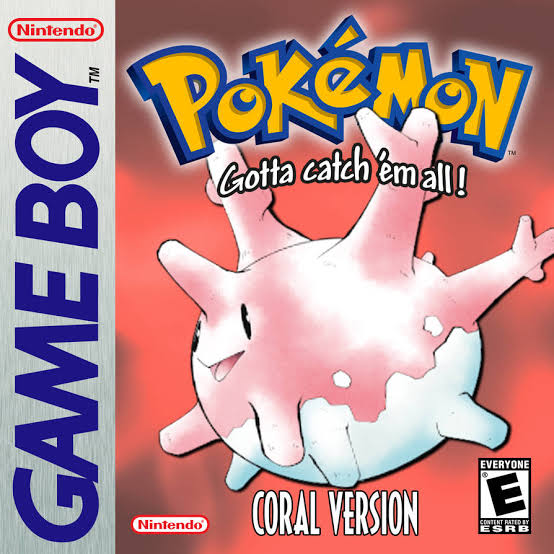
Pokémon Coral is an ambitious Game Boy Color ROM hack by coraldev set in the original Onwa Region. It is designed to recapture the feeling of discovering Pokémon Gold, Silver, and Crystal for the first time while adding much more modern mechanics such as abilities, the Physical/Special Split, Fairy typing, Pokémon from later generations, running shoes, new music, custom Pokémon graphics, and 60 FPS gameplay.
The most important thing to understand before installing it is that Pokémon Coral is still in development.
As of August 30, 2026, the newest public player-facing demo I could verify remains:
Pokémon Coral 2022 Demo v1.2
The official PokéCommunity listing identifies the download as 2022 Demo v1.2, dated December 30, 2022, and says that it continues through the fourth Gym and beyond. The official Coral GitHub account separately maintains an archived repository specifically labeled “2022 Demo Version 1.2.”
Development has not stopped, however. The current official repository is:
pkmncoraldev/polishedcoral
and identifies itself as Pokémon Coral Version – Ported to PolishedCrystal. It has thousands of source commits and represents the continuing development version of Coral rather than the old archived 2022 demo source.
For most players who want to play Coral today, the normal installation is:
Clean English Pokémon Crystal v1.0 + Pokémon Coral 2022 Demo v1.2 IPS patch = Pokémon Coral
Rom Professor does not provide, host, or link to copyrighted Pokémon Crystal ROMs or pre-patched Pokémon Coral ROMs. You need to provide your own legally obtained copy of Pokémon Crystal and apply the fan-made IPS patch yourself.
What You Need Before Installing Pokémon Coral
For the currently available public demo, you need:
- A clean English Pokémon Crystal ROM
- Pokémon Coral 2022 Demo v1.2
- The official
.ipspatch - An IPS-compatible ROM patcher
- An emulator with proper MBC30 support
- Normal battery-save support
- Real-time-clock support
- A backup of your clean Crystal ROM
- A safe location for your Coral save
Pokémon Coral Installation Requirements
| Requirement | Recommended Choice |
|---|---|
| Hack | Pokémon Coral |
| Creator | coraldev |
| Base | Pokémon Crystal |
| Platform | Game Boy Color |
| Public version | 2022 Demo v1.2 |
| Public demo status | Incomplete |
| Patch format | IPS |
| Recommended Crystal revision | English Crystal v1.0 |
| Crystal v1.0 SHA-1 | f4cd194bdee0d04ca4eac29e09b8e4e9d818c133 |
| Special mapper | MBC30 |
| RTC | Recommended |
| Best PC emulators | BGB, SameBoy, mGBA |
| Android | RetroArch + SameBoy/mGBA or compatible Pizza Boy Pro |
| Old MyOldBoy | Avoid for Coral |
| Normal save backups | Strongly recommended |
The Rom Professor question-bank brief specifically treats Coral as a modern Gen 2-style demo/new-region hack, warns that it should still be covered as a demo until a full release is verified, and calls for installation, emulator, update, troubleshooting, version, and safe-ROM guidance.
What Is the Latest Version of Pokémon Coral?
The latest public demo release I could verify is:
Pokémon Coral 2022 Demo v1.2
The official PokéCommunity search listing currently says:
DOWNLOAD 2022 DEMO v1.2 (12/30/22)
and describes the demo as reaching through the fourth Gym and additional content beyond it.
The developer’s GitHub account has an archived repository called:
polishedcoral2022
whose description is explicitly:
2022 Demo Version 1.2.
Is There a Newer Development Version?
Yes—in source form.
The current development repository is:
polishedcoral
and describes itself as Pokémon Coral ported to Polished Crystal.
The old 2022 demo repository was archived in January 2023, while the new repository remains the active codebase.
However:
I could not verify a newer official public player release replacing Demo v1.2.
That distinction matters.
Do not assume that because development commits exist, there is automatically a new stable patch you should download.
For a normal player:
public playable demo = 2022 Demo v1.2
current development = polishedcoral source
For future changes, see our Pokémon Coral latest version guide.
Is Pokémon Coral Complete?
No.
Pokémon Coral remains an in-development ROM hack.
The 2022 Demo v1.2 contains a substantial chunk of the Onwa adventure but does not contain the complete planned eight-Gym campaign.
Player reports consistently identify the demo as containing:
four obtainable Gym Badges, with the player able to continue farther into the world toward the area of the fifth Gym before reaching the demo’s progression limit.
The original project description says Coral’s eventual intended journey involves traveling through Onwa, collecting:
eight Onwa League Badges
and working toward challenging the Onwa Pokémon League.
So:
Is the demo substantial? Yes.
Can you finish the intended complete Onwa League adventure in v1.2? No.
Is Pokémon Coral Still Being Developed?
Yes.
The Coral developer’s official GitHub account currently has:
polishedcoral
as its main/popular repository, described as the Pokémon Coral Version port to Polished Crystal.
The current repository contains thousands of commits and a large amount of new game data, including maps, music, graphics, events, mechanics, and other systems beyond the archived 2022 codebase.
The important takeaway is:
The project is alive; the public demo is simply older than the current development source.
Do not mistake “latest public demo is from 2022” for “development ended in 2022.”
What Base ROM Does Pokémon Coral Use?
Pokémon Coral uses:
Pokémon Crystal
not Pokémon Gold or Silver.
The 2022 demo was rebuilt using the Polished Crystal engine, while the current source continues that Polished Crystal-based development path.
The normally documented 2022 Demo IPS targets:
Pokémon Crystal USA/Europe v1.0
Current patch-reference documentation for Coral identifies the hack as:
- Base ROM: Pokémon Crystal
- Patch: IPS
- Status: Development / Demo
- Revision: Crystal UE v1.0
Correct Crystal v1.0 SHA-1
The official pret Pokémon Crystal source project identifies the standard English v1.0 ROM as:
f4cd194bdee0d04ca4eac29e09b8e4e9d818c133
For comparison, Crystal v1.1 is:
f2f52230b536214ef7c9924f483392993e226cfb
Pokémon Coral Base-ROM Table
| Crystal Version | SHA-1 | Use for 2022 Demo? |
|---|---|---|
| Crystal v1.0 | f4cd194bdee0d04ca4eac29e09b8e4e9d818c133 | Yes |
| Crystal v1.1 | f2f52230b536214ef7c9924f483392993e226cfb | No, unless a future Coral release specifically requests it |
Coral is still under active development, so always prioritize the instructions bundled with the exact future Coral patch you are installing if those requirements ever change.
Do Not Use Pokémon Gold
Coral is not a Pokémon Gold hack.
Despite visually resembling a lost Generation 2 game:
use Crystal.
Do Not Use Pokémon Silver
Same answer:
use Crystal.
Do Not Use a Previously Patched Crystal ROM
Your source ROM should not already contain:
- Crystal Clear
- Polished Crystal
- Crystal Legacy
- Pokémon Orange
- Pokémon Bronze 2
- Another Coral version
- Randomizer modifications
- Cheats baked into the ROM
Use a clean Crystal base.
A patch is designed around exact ROM offsets. If another hack already changed those addresses, you can create a ROM that technically patches but behaves unpredictably.
Where to Get Pokémon Coral Safely
The main official player-facing project thread is Pokémon Coral’s PokéCommunity page.
Pokémon Coral official PokéCommunity thread
That page identifies the current public demo as:
2022 Demo v1.2.
The developer’s GitHub account is also an important official source:
Pokémon Coral developer GitHub
The current development repository is:
Current Pokémon Coral source repository
The older 2022 demo source is archived separately and should not be mistaken for the live development repository.
Avoid Pre-Patched Pokémon Coral ROMs
Do not search for:
Pokemon Coral ROM
and download a random complete .gbc.
Besides the copyright issue, you may have no idea whether you received:
- 2017 Demo
- 2018 Demo
- 2022 Demo v1.0
- 2022 Demo v1.1
- 2022 Demo v1.2
- An unofficial development compile
- A modified version
- A broken MBC30 build
The current public patch is an:
IPS patch
and even contemporary Coral playthrough descriptions point players back to the PokéCommunity IPS download.
Patch your own Crystal ROM.
What Patch Format Does Pokémon Coral Use?
The 2022 Demo uses:
IPS
Multiple contemporary playthroughs made when the demo released explicitly identify the official PokéCommunity download as an .ips patch.
That means you can use an IPS-compatible patcher such as:
- Floating IPS / FLIPS
- Rom Patcher JS
- Lunar IPS
- UniPatcher on Android
You do not open the .ips itself in an emulator.
The patch contains the changes between Pokémon Crystal and Pokémon Coral.
How to Patch Pokémon Coral
Step 1: Download the 2022 Demo v1.2 Patch
Go to the official Pokémon Coral PokéCommunity page.
Look for:
2022 Demo v1.2
The indexed official post dates that patch:
December 30, 2022.
Do not accidentally install an older 2017 or 2018 demo.
Step 2: Prepare Clean English Pokémon Crystal v1.0
Your recommended base should have SHA-1:
f4cd194bdee0d04ca4eac29e09b8e4e9d818c133
If your ROM is inside:
.zip
.rar
or:
.7z
extract it first.
You need the actual:
.gbc
file.
Step 3: Keep an Untouched Crystal Backup
Make a copy such as:
Pokemon Crystal CLEAN v1.0.gbc
Never modify that backup.
Coral is still under development, so having a clean base ready will make future repatching much easier.
Step 4: Open an IPS Patcher
On PC or Mac, use a reliable IPS patcher.
On Android, UniPatcher can apply IPS patches; contemporary Coral installation/playthrough documentation specifically mentions it as a mobile option.
Step 5: Select Pokémon Crystal
Your source ROM should be:
clean Crystal v1.0
not another Coral build.
Step 6: Select the Coral v1.2 IPS
Select the .ips file downloaded from the Coral project page.
The basic configuration is:
Source: Pokémon Crystal v1.0
Patch: Pokémon Coral 2022 Demo v1.2 IPS
Step 7: Apply the Patch
Choose:
Apply Patch
The result will be a new .gbc game file.
Step 8: Rename the Finished ROM
A clear filename is:
Pokemon Coral Demo v1.2.gbc
That makes it obvious what you have.
If a future release appears, you can preserve the old one as:
Pokemon Coral Demo v1.2 OLD.gbc
instead of overwriting it.
Step 9: Use an MBC30-Compatible Emulator
This step is more important for Coral than for most Game Boy Color hacks.
Pokémon Coral’s 2022 demo and newer development builds use the:
MBC30 mapper
to access additional ROM and save memory for features such as sampled Pokémon cries and expanded content.
Not every Game Boy Color emulator supports MBC30 properly.
Use one that does.
Step 10: Start the Game and Check for a Mapper Warning
Coral may warn you if your emulator does not properly support MBC30.
If you see a message indicating that the emulator or flashcart lacks MBC30 support:
switch emulator.
Do not ignore it simply because the game boots.
Partial mapper support can cause:
- Missing or placeholder cries
- Save-memory problems
- Broken features
- Crashes later in the game
Players have specifically reported Coral running but replacing some newer Pokémon cries when the emulator lacked full MBC30 support.
Step 11: Make a Normal Test Save
Before investing hours:
- Start Coral.
- Make an in-game save.
- Close the emulator completely.
- Reopen Coral.
- Confirm Continue appears.
- Load the save.
- Save again.
This is especially important because Coral uses more demanding mapper/save behavior than vanilla Crystal.
Suggested screenshot: Capture your own patching screen showing Crystal v1.0 + Coral v1.2 IPS, plus the Coral title screen. A screenshot of the official project page identifying Demo v1.2 is another strong choice.
What Is MBC30, and Why Does Pokémon Coral Need It?
This is the technical quirk that makes Coral installation different from most Gen 2 hacks.
Pokémon Gold, Silver, and international Crystal normally use the MBC3 family of cartridge mappers.
MBC30 is an expanded variant capable of accessing more ROM and save memory.
A compatibility reference explains that MBC30 can support:
- Up to 4 MB ROM
- Up to 64 KB SRAM
instead of the lower normal MBC3 limits.
Pokémon Coral 2022 Demo and later development use that extra space for things including sampled cries and other expanded content.
This means:
an emulator can run ordinary Pokémon Crystal perfectly and still fail Pokémon Coral.
Coral requires the extra mapper behavior.
Best Emulator for Pokémon Coral on Windows
The strongest options are:
- BGB
- SameBoy
- mGBA
A detailed MBC30 compatibility test identifies all three as having full MBC30 support, with BGB specifically labeled a best choice and SameBoy/mGBA also fully supported.
BGB
Excellent for:
- Windows
- Accuracy
- MBC30
- Debugging weird ROM behavior
If you simply want Coral to work:
BGB is an excellent default on Windows.
SameBoy
SameBoy also has full MBC30 compatibility and works on multiple platforms.
mGBA
mGBA has full MBC30 support too.
It is particularly useful if you already use mGBA for your GBA ROM hacks and want fewer emulator programs.
Best Emulator for Pokémon Coral on Mac
Use:
SameBoy
or:
mGBA
Both are listed with full MBC30 support.
For Mac users I would lean toward SameBoy for a dedicated Game Boy/Game Boy Color experience.
Best Emulator for Pokémon Coral on Android
Android compatibility is more complicated.
Best Cross-Platform Choice
Use:
RetroArch + SameBoy core
The MBC30 compatibility reference specifically identifies RetroArch using the SameBoy core as having full support across multiple devices, including Android.
mGBA Core
mGBA is another good option if your frontend makes it available.
A Coral player who received the mapper warning under Gambatte reported that switching to mGBA fixed the problem.
Pizza Boy Pro
Modern versions of:
Pizza Boy Pro
are also reported as having MBC30 support from v5.4.5 onward.
Avoid MyOldBoy for Coral
The MBC30 compatibility table identifies:
MyOldBoy!
as not supporting the mapper required by Coral.
This is particularly important because MyOldBoy works perfectly well for many normal GBC games.
Coral is different.
Does Gambatte Work With Pokémon Coral?
Not completely reliably.
The MBC30 compatibility reference rates standalone Gambatte as:
partial / incomplete / unknown
rather than full support.
A real Coral user found that Gambatte allowed the game to run but triggered the MBC30 warning and caused incomplete cries; switching to mGBA resolved the issue.
Therefore:
Do not make Gambatte your first Coral emulator.
Use SameBoy, BGB, or mGBA instead.
Can I Play Pokémon Coral on iPhone or iPad?
Yes, but emulator choice matters because of MBC30.
The safest cross-platform approach supported by the compatibility reference is:
RetroArch + SameBoy core
which is listed as fully supporting MBC30 across multiple host platforms, including iOS.
Do not simply assume every Game Boy Color emulator on iOS supports Coral because it supports Pokémon Crystal.
Test for:
- MBC30 warning
- Proper saves
- Correct cries
- Stable PC storage
- RTC behavior
before committing to a long playthrough.
Does Delta Support Pokémon Coral?
I could not verify a reliable current MBC30 compatibility guarantee for Delta from the sources used for this guide.
Because MBC30 support is essential rather than optional:
I would not make Delta my default recommendation for Coral unless you personally confirm the current version handles MBC30 correctly.
SameBoy-based emulation is the safer documented option.
Best Emulator Settings for Pokémon Coral
| Setting | Recommendation |
|---|---|
| Hardware | Game Boy Color |
| Mapper | Must support MBC30 |
| Windows | BGB / SameBoy / mGBA |
| macOS | SameBoy / mGBA |
| Android | RetroArch + SameBoy or mGBA |
| iPhone/iPad | RetroArch + SameBoy |
| Save type | Automatic/default |
| RTC | Enabled |
| Save states | Secondary only |
| Battery saves | Essential |
| Gambatte | Not preferred |
| MyOldBoy | Avoid |
| VBA | Avoid |
Does Pokémon Coral Need RTC?
Use an emulator with functioning RTC support.
Coral is built on the Pokémon Crystal family of engines and includes time-of-day information as part of Pokémon data and gameplay systems. Contemporary 2022-demo footage specifically shows Pokémon status information tracking the location and time of day where a Pokémon was caught.
The source also contains a separate nortc build target, which indicates RTC behavior is an intentional part of the normal game and can only be specifically disabled in alternate builds.
For ordinary players:
use RTC.
Can Pokémon Coral Run on Real Game Boy Color Hardware?
Yes—but not on every flashcart.
This is another consequence of MBC30.
A dedicated MBC30 compatibility reference warns that traditional EverDrive setups do not fully support the mapper and recommends specialized MBC30-compatible flash hardware instead.
BennVenn’s modern MBC3000 cartridge, for example, explicitly lists:
Pokémon Coral
among its tested compatible games and supports MBC30 plus RTC.
So:
Original GBC hardware = possible
Any random flashcart = not necessarily
Will Pokémon Coral Work on an EverDrive?
Do not assume it will.
MBC30 compatibility documentation specifically warns that EverDrive hardware historically lacks the required support for Coral’s mapper.
Even if a particular future firmware changes this:
verify MBC30 support before buying or configuring hardware specifically for Coral.
What Content Is in Pokémon Coral Demo v1.2?
The 2022 Demo contains:
- Onwa Region exploration
- Four obtainable Gym Badges
- Additional areas beyond the fourth Gym
- Multiple optional locations/events
- Custom story content
- Pokémon from several generations
- Modern battle mechanics
- Custom music
- Running Shoes
- New abilities
- Fairy typing
- Physical/Special Split
- Custom graphics
The official project description says the demo was rebuilt in the Polished Crystal engine and added features such as:
- 60 FPS gameplay
- Abilities
- Physical/Special Split
- Fairy type
- Pokémon from seven generations
- New soundtrack
- Running animation
- HM use without teaching the move
The demo ends before the intended complete eight-Gym game is finished.
How to Update Pokémon Coral Without Losing Your Save
This is where I recommend extra caution.
I could not verify an official blanket statement guaranteeing save compatibility between the 2022 Demo v1.2 and a future full release.
That matters because Coral has undergone a major development transition.
The archived 2022 repository is specifically labeled:
2022 Demo Version 1.2
while current development has moved into the separate:
polishedcoral
repository based on the newer Polished Crystal engine.
That means:
Do not assume your v1.2 save will work in the eventual full game.
Wait for coraldev’s official migration instructions when that release arrives.
Updating Between Small Demo Revisions
If another compatible demo patch appears and the creator confirms save compatibility:
Step 1: Make a Normal Save
Use the in-game SAVE option.
Avoid using a save state as your only progress.
Step 2: Back Up the .sav
For example:
Pokemon Coral.sav
Copy it to:
Pokemon Coral BACKUP.sav
Step 3: Keep the Old Coral ROM
Never throw away the ROM that created the save.
Keep:
- Old
.gbc - Old
.sav
together.
Step 4: Patch a Fresh Crystal ROM
Do not apply:
new Coral IPS → old Coral ROM
unless the developer specifically tells you to.
Use:
clean Crystal + new patch
Step 5: Match Filenames
If your save is:
Pokemon Coral.sav
your new ROM should normally be:
Pokemon Coral.gbc
so the emulator finds the save automatically.
Step 6: Test a Copy
Load the save.
Check:
- Party
- PC boxes
- Items
- Pokédex
- Badges
- Current location
- Story events
- RTC
- Pokémon cries
Step 7: Save Again
Make a normal save.
Close the emulator.
Restart.
Verify again.
Should I Carry My Demo v1.2 Save Into the Full Release?
Unless coraldev explicitly says yes:
assume no.
Coral’s full game has continued changing for years after the 2022 demo, including an engine/source transition.
A fresh save may be necessary to avoid:
- Broken event flags
- Map mismatches
- Invalid Pokémon data
- Corrupted storage
- Missing story triggers
Wait for official release notes.
Do Not Update With a Save State
Save states contain:
- Emulator RAM
- CPU state
- Old map data
- Old scripts
- Old ROM execution state
They are not a substitute for a normal battery save when changing game versions.
Use the normal:
.sav
file.
Common Pokémon Coral Installation Problems
“The IPS Patch Won’t Apply”
Check your base.
For Demo v1.2, use clean English:
Pokémon Crystal v1.0
SHA-1:
f4cd194bdee0d04ca4eac29e09b8e4e9d818c133
Do not use:
- Crystal v1.1
- Another hack
- An old Coral ROM
- Japanese Crystal
unless the exact Coral release you are installing explicitly says otherwise.
“My Patch Applies but the Game Crashes”
IPS does not provide the same strong source validation that BPS can.
A wrong base may still produce an output file.
Verify your clean Crystal SHA-1.
Then test the ROM in:
- BGB
- SameBoy
- mGBA
before assuming Coral itself is broken.
“My Emulator Says MBC30 Is Unsupported”
Switch emulators.
This is a serious compatibility warning.
Recommended:
- BGB
- SameBoy
- mGBA
“The Game Works but Some Pokémon Have Wrong/Placeholder Cries”
That can be incomplete MBC30 support.
A player experienced this under Gambatte and fixed it by switching to mGBA.
“The PC Crashes the Game”
Emulator incompatibility has historically caused PC/storage crashes in Coral.
A 2022 playthrough author reported needing to switch emulators after an older setup crashed while using the PC.
Because Coral uses expanded save/memory behavior:
test in SameBoy, mGBA, or BGB.
“Can I Use MyOldBoy?”
I do not recommend it.
The MBC30 compatibility table lists MyOldBoy as lacking the required mapper support.
“Can I Use Gambatte?”
It may partially work.
But MBC30 support is not complete enough to make it my first recommendation.
“Can I Use VBA?”
No reason to.
The MBC30 compatibility reference marks classic VBA as unsupported.
Use a proper GB/GBC emulator.
“Normal Pokémon Crystal Starts”
You opened your clean ROM instead of the patched game.
Keep filenames obvious:
Pokemon Crystal CLEAN.gbc
Pokemon Coral Demo v1.2.gbc
“Can I Rename the IPS to GBC?”
No.
A patch is not a game.
You must actually apply:
IPS + Crystal
to generate the Coral ROM.
“I Reached the Fifth Gym Area but Can’t Continue”
That may be the end of currently implemented demo progression.
The public v1.2 demo contains four obtainable Gym Badges and lets you explore beyond the fourth Gym, but it is not the complete eight-Gym game.
“Is There a Full Pokémon Coral Release?”
Not one I could verify as publicly released as of August 30, 2026.
Development continues in the official polishedcoral source repository, but the latest public demo remains v1.2.
“I Saw Someone Calling It Demo 3”
That appears to refer to the same 2022-era v1.2 demo.
Players have noted that the in-game credits describe it as “Version 3 Demo,” while the official public release name is 2022 Demo v1.2.
For clarity in guides:
call the public release 2022 Demo v1.2.
“Does Coral Run at 60 FPS?”
Yes.
The 2022 rebuild is specifically described as running at:
60 FPS
using the Polished Crystal engine.
That is one reason Coral can feel dramatically smoother than vanilla Crystal.
“Does Coral Have Abilities?”
Yes.
Abilities are one of the major systems added through the Polished Crystal-based rebuild.
“Does Coral Have the Physical/Special Split?”
Yes.
The project includes the modern move-by-move Physical/Special Split.
“Does Coral Have Fairy Type?”
Yes.
Fairy typing is part of the modern mechanics added to the game.
“Does Coral Have Pokémon From Later Generations?”
Yes.
The 2022 demo description says Pokémon from all seven generations represented at the time were incorporated with custom-style artwork designed to fit the Game Boy Color aesthetic.
How to Verify That Pokémon Coral Installed Correctly
Check the Base Before Patching
For the public 2022 Demo:
Pokémon Crystal v1.0
SHA-1:
f4cd194bdee0d04ca4eac29e09b8e4e9d818c133
Check the Version
You want:
Pokémon Coral 2022 Demo v1.2
Check the Region
You should enter:
Onwa
not Johto.
Check the Mechanics
You should quickly see features inconsistent with normal Crystal, including:
- 60 FPS movement
- Running animation
- Modern Pokémon
- Abilities
- Physical/Special Split
- New graphics
- New music
Check for MBC30 Warnings
If the game warns you that MBC30 is unsupported:
switch emulator.
Test Saving
- Save normally.
- Close the emulator.
- Reopen Coral.
- Confirm Continue appears.
- Load your save.
- Visit a PC.
- Save again.
Testing the PC is useful because expanded storage behavior is one area where incompatible emulators have historically exposed problems.
Pokémon Coral Installation FAQ
What is the latest version of Pokémon Coral?
The latest public demo I could verify is:
Pokémon Coral 2022 Demo v1.2, released December 30, 2022.
Is Pokémon Coral still being developed?
Yes.
Current development is happening in the official:
pkmncoraldev/polishedcoral
repository.
Is Pokémon Coral complete?
No.
The current public demo includes four Gym Badges and additional content beyond the fourth Gym, but the intended full game includes eight Onwa League Badges.
What base ROM does Pokémon Coral use?
Pokémon Crystal.
For the 2022 Demo v1.2, use clean English Crystal v1.0.
SHA-1:
f4cd194bdee0d04ca4eac29e09b8e4e9d818c133
Does Coral use Crystal v1.1?
The standard documented v1.2 demo patch targets Crystal v1.0.
If a future release explicitly changes the base requirement, follow that release’s own documentation.
What patch format does Coral use?
IPS.
Where should I get Pokémon Coral?
Use the official project thread:
Pokémon Coral on PokéCommunity
and the developer’s official GitHub:
Pokémon Coral developer GitHub
Can I download a pre-patched Pokémon Coral ROM?
Rom Professor does not recommend or link to pre-patched Pokémon ROMs.
Use the official IPS patch and your own clean Pokémon Crystal ROM.
What emulator should I use?
The strongest choices are:
- BGB
- SameBoy
- mGBA
All three have documented full MBC30 support.
Can I play Coral on Android?
Yes.
The safest documented choices include:
- RetroArch + SameBoy
- mGBA-based setup
- Recent Pizza Boy Pro
Avoid MyOldBoy for Coral because it lacks MBC30 support.
Can I play Coral on iPhone?
Yes, but choose an emulator/core with proper MBC30 support.
RetroArch + SameBoy is the clearest documented cross-platform option.
Does Coral work in Gambatte?
Partially in some configurations.
It is not the recommended choice because its MBC30 support is incomplete.
What is MBC30?
MBC30 is an expanded Game Boy cartridge mapper capable of accessing more ROM and SRAM than normal MBC3.
Pokémon Coral uses it for additional content such as sampled cries.
Can I play Coral on a real Game Boy Color?
Yes, with compatible hardware.
You need an MBC30-capable flashcart/cartridge setup.
Not every ordinary EverDrive supports Coral correctly.
Does Pokémon Coral need RTC?
Use RTC support.
Coral retains time-based systems and includes normal RTC-oriented builds, while its source even offers a separate nortc compile option.
Can I keep my v1.2 save when the full game releases?
Do not assume so.
I could not verify an official save-compatibility guarantee between Demo v1.2 and the eventual full release.
Keep the save backed up and wait for coraldev’s official migration instructions.
Should I patch a future Coral update over my old Coral ROM?
Unless the creator explicitly says otherwise:
no.
Use a fresh clean Crystal base with the new patch, then migrate a backed-up normal battery save only if compatibility is confirmed.
Should I use save states when updating?
No.
Use the normal .sav file.
Where should I go after installing Pokémon Coral?
Once Coral is running correctly, read our Pokémon Coral beginner guide.
Coral may look like another lost Generation 2 game, but many systems operate differently from ordinary Crystal, including:
- Abilities
- Physical/Special Split
- Fairy typing
- Modern Pokémon
- HM behavior
- Running Shoes
- Custom items
- Updated moves
- Onwa-specific progression
Also see our Pokémon Coral main guide for a broader overview of Onwa and our Pokémon Coral latest version guide for tracking the eventual transition from the public 2022 Demo v1.2 to the current Polished Coral development build.
Suggested article screenshots: Use your own Pokémon Coral title screen, a patching screenshot showing clean Pokémon Crystal v1.0 + Coral v1.2 IPS, and a screenshot of the official PokéCommunity/GitHub project page. A mapper-warning screenshot is also extremely useful for the troubleshooting section because MBC30 compatibility is one of the most important installation differences between Coral and ordinary Crystal hacks.




