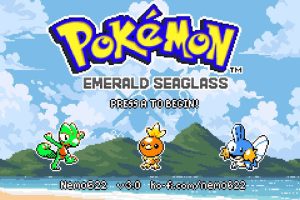
How to Download and Install Pokémon Emerald Seaglass Safely

Pokémon Emerald Seaglass is distributed as an IPS patch for Pokémon Emerald, not as a complete Pokémon ROM. To install it safely, you need the official Emerald Seaglass patch from creator Nemo622, a clean copy of the correct Pokémon Emerald base ROM that you legally obtained yourself, an IPS-compatible patcher, and a Game Boy Advance emulator.
The current official release is Pokémon Emerald Seaglass v3.0. Nemo622’s current Ko-fi download provides the v3.0 IPS patch, a documentation PDF, and a patch-notes file. The creator’s Ko-fi shop still presents 3.0 as the current Emerald Seaglass release as of August 2026.
Version 3.0 originally released on September 21, 2024. Nemo622’s release announcement also confirmed that saves remain compatible between Emerald Seaglass versions, making upgrades much easier than they are in many ROM hacks.
Rom Professor does not host, provide, or link to copyrighted Pokémon Emerald ROM files or pre-patched Emerald Seaglass ROMs. This guide explains how to apply the official Seaglass patch to a clean Pokémon Emerald ROM that you supply yourself.
What You Need Before Installing Pokémon Emerald Seaglass
Before starting, you need:
- A clean Pokémon Emerald USA ROM
- The official Pokémon Emerald Seaglass v3.0 IPS patch
- An IPS-compatible ROM patcher
- A Game Boy Advance emulator
- A way to extract ZIP files
- A safe place to keep your clean Emerald ROM and save backups
The official Emerald Seaglass download includes:
- The
.ipspatch - A documentation PDF
- Patch notes for v3.0
Nemo622 distributes the patch free through Ko-fi. The donation option is optional; the creator explicitly notes that the files can be obtained without paying.
The patch itself is not playable.
You combine:
Clean Pokémon Emerald + Emerald Seaglass IPS patch
to create:
Pokémon Emerald Seaglass .gba
That resulting .gba file is what your emulator opens.
Do not try to load the .ips patch directly into Delta, mGBA, RetroArch, Pizza Boy, My Boy, or another GBA emulator.
What Base ROM Does Pokémon Emerald Seaglass Use?
Pokémon Emerald Seaglass expects the standard clean American Pokémon Emerald ROM commonly identified as:
1986 - Pokemon Emerald (U)(TrashMan).gba
Current Emerald Seaglass community installation guidance continues to identify the TrashMan Emerald ROM as the correct base. A December 2025 player who could not get Seaglass running eventually discovered that the wrong Emerald base was the problem; repatching with the TrashMan version fixed the installation.
The commonly associated clean Pokémon Emerald checksums are:
CRC32
1F1C08FB
MD5
605B89B67018ABCEA91E693A4DD25BE3
SHA-1
F3AE088181BF583E55DAF962A92BB46F4F1D07B7
You generally do not need to check all three.
If the patch will not apply or the finished game behaves strangely, verifying:
CRC32: 1F1C08FB
is a quick way to confirm that you actually have the expected Emerald base.
The filename alone is not enough.
Someone can rename any ROM:
1986 - Pokemon Emerald (U)(TrashMan).gba
without changing the file’s internal data.
Do not use:
- Pokémon Ruby
- Pokémon Sapphire
- Another regional Emerald ROM
- A modified Emerald ROM
- Another Emerald ROM hack
- An old Emerald Seaglass ROM
- A randomized Emerald ROM
- An already patched game
- A ZIP file instead of the extracted
.gba
Keep one untouched copy of your clean Pokémon Emerald ROM somewhere safe.
For example:
Pokemon Emerald CLEAN.gba
Whenever you need to reinstall or update Emerald Seaglass, make a copy of that clean file and patch the copy.
Where to Get the Official Pokémon Emerald Seaglass Patch
The official source is Nemo622’s Ko-fi shop.
The current v3.0 listing contains:
- Emerald Seaglass 3.0 IPS patch
- Documentation PDF
- Patch Notes TXT file
Official Pokémon Emerald Seaglass v3.0 patch and documentation
The listing specifically identifies the download as:
Pokémon Emerald Seaglass 3.0 – Patch + Documentation.
Nemo622 also uses their Ko-fi page as the main website for ROM-hack development updates and patch releases.
That is preferable to searching for something like:
Pokemon Emerald Seaglass ROM download
or:
Pokemon Emerald Seaglass prepatched GBA
Pre-patched ROM sites create several problems.
You may have no reliable way to know:
- Whether the ROM is really v3.0
- Whether somebody modified it
- Whether cheats were baked into it
- Whether the correct Emerald base was used
- Whether it contains an old Seaglass version
- Whether it has been repackaged with unrelated patches
The official Ko-fi page gives you the actual creator-provided IPS patch instead.
What Is the Latest Version of Pokémon Emerald Seaglass?
As of August 29, 2026, the latest official version is:
Pokémon Emerald Seaglass v3.0
Nemo622’s current Ko-fi shop still lists v3.0 as the current downloadable Seaglass patch.
Version 3.0 was announced on September 21, 2024.
Major v3.0 changes included:
- New title-screen graphics
- Brendan and May as the protagonists
- New overworld sprites for major characters
- Updated Gym Leader sprites
- Updated Elite Four sprites
- Updated Frontier Brain sprites
- More Game Boy Color-style item graphics
- Battle-background adjustments
- A fix for the Pinball visual bug
- Additional balance changes
- Additional bug fixes
If you encounter a website offering something labeled:
Emerald Seaglass 3.1
or:
Emerald Seaglass 4.0
verify it against Nemo622’s official Ko-fi page before assuming it is legitimate.
For future updates, see our Pokémon Emerald Seaglass latest version guide.
How to Patch Pokémon Emerald Seaglass
Emerald Seaglass 3.0 uses an:
IPS patch
That means you need an IPS-compatible patcher.
Good options include:
- Rom Patcher JS
- Lunar IPS
- Floating IPS
For most players, a browser-based patcher is easiest.
Step 1: Download the Official Emerald Seaglass Patch
Get the v3.0 package from Nemo622’s official Ko-fi listing.
Extract the download.
Inside, locate the Emerald Seaglass:
.ips
file.
Do not try to open this file in your emulator.
It contains the differences between Pokémon Emerald and Emerald Seaglass.
Step 2: Prepare Your Clean Pokémon Emerald ROM
Locate your legally obtained clean Pokémon Emerald ROM.
The expected base is the standard:
1986 - Pokemon Emerald (U)(TrashMan).gba
If it is inside a:
.zip
.7z
or:
.rar
archive, extract it first.
You need the actual:
.gba
file.
Keep the clean original untouched.
Make a copy before patching.
Step 3: Open an IPS-Compatible Patcher
Open your patching tool.
If you use Rom Patcher JS, you should see fields similar to:
ROM file
and:
Patch file
If you use Lunar IPS, choose:
Apply IPS Patch
Both accomplish essentially the same thing.
Step 4: Select the Clean Pokémon Emerald ROM
Under the ROM or source-file field, select:
Pokemon Emerald.gba
This must be your clean TrashMan Emerald ROM.
Do not select:
- An old Seaglass ROM
- Another Emerald hack
- The IPS patch
- A save file
Step 5: Select the Emerald Seaglass IPS Patch
Under the patch field, choose the:
Emerald Seaglass v3.0 .ips
file from Nemo622’s package.
Your setup should now effectively be:
ROM: Clean Pokémon Emerald
Patch: Emerald Seaglass 3.0 IPS
Step 6: Apply the Patch
Choose:
Apply Patch
or the equivalent button.
The patcher combines the two files and creates a new ROM.
That output should end in:
.gba
For example:
Pokemon Emerald Seaglass.gba
Step 7: Rename the Finished ROM
You can rename it something more descriptive.
For example:
Pokemon Emerald Seaglass 3.0.gba
The game itself does not care about the filename.
Your emulator might, especially once a save file has been created.
For that reason, choose a name you are comfortable keeping before beginning a long playthrough.
Step 8: Open the Patched ROM in Your Emulator
Launch your GBA emulator.
Open:
Pokemon Emerald Seaglass 3.0.gba
You should see the Emerald Seaglass title screen rather than normal Pokémon Emerald.
If normal Pokémon Emerald starts instead, you probably opened the original base ROM.
Step 9: Make a Normal Save
Start the game.
Play until the normal save function is available.
Save in-game.
Then:
- Close the emulator completely.
- Reopen Emerald Seaglass.
- Confirm that Continue appears.
- Load your save.
Doing this immediately ensures your emulator is actually creating battery saves correctly.
How to Patch Emerald Seaglass With Lunar IPS
If you prefer a traditional desktop patcher, Lunar IPS works because Seaglass uses IPS format.
The process is:
- Open Lunar IPS.
- Select Apply IPS Patch.
- Choose the Emerald Seaglass 3.0
.ips. - Choose your clean Pokémon Emerald
.gba. - Allow the patcher to modify the working copy.
- Rename the result if desired.
- Open the
.gbain your emulator.
Always keep the untouched Emerald base separately.
Lunar IPS modifies the selected ROM directly, so using a copy rather than your only clean base is especially important.
How to Play Pokémon Emerald Seaglass on Windows, Mac, Android, and iPhone
Emerald Seaglass is still technically a Game Boy Advance game.
Once patched, it behaves like a GBA ROM and can run in a compatible emulator.
Windows
For Windows, mGBA is my first recommendation.
It is actively maintained, accurate, and handles Pokémon Emerald-based hacks well.
To play:
- Install mGBA.
- Open the emulator.
- Select the Emerald Seaglass
.gba. - Configure your keyboard or controller.
- Start the game.
- Make a normal in-game save.
You generally do not need to change advanced settings.
Leave:
- Save type
- CPU timing
- BIOS
- Flash settings
- Frameskip
at their defaults unless you encounter a specific problem.
Mac
mGBA is also an excellent choice on macOS.
The process is almost identical:
- Install mGBA.
- Open your patched Seaglass
.gba. - Configure controls.
- Save normally.
- Restart the emulator.
- Confirm your save works.
Android
For Android, good options include:
- Pizza Boy GBA
- RetroArch with the mGBA core
- Other accurate modern GBA emulators
A recent 2025 Emerald Seaglass troubleshooting thread shows the game working once the user repatched it with the correct TrashMan Emerald base; the original issue was the ROM, not Android itself.
The process is:
- Patch Emerald Seaglass.
- Save the completed
.gbaon your phone. - Open your GBA emulator.
- Browse to the
.gba. - Launch the game.
- Save normally.
If one Android emulator behaves strangely, test the exact same ROM in RetroArch with the mGBA core before repatching.
iPhone and iPad
Delta is one of the easiest options on iPhone and iPad.
Emerald Seaglass players have been using Delta since the hack’s early releases, and current community resources continue to treat iOS play as straightforward once the game has been properly patched.
To use Delta:
- Patch Emerald Seaglass first.
- Save the resulting
.gbato the Files app. - Open Delta.
- Press the
+button. - Choose Files.
- Select your Emerald Seaglass
.gba. - Start playing.
Delta does not need the IPS patch.
It needs the completed .gba.
Retro Handhelds
Emerald Seaglass also works on many retro handheld emulation devices.
For devices that offer several GBA cores, start with:
mGBA
If performance is poor on a particularly low-powered handheld, another optimized GBA core may run faster, but mGBA is a good compatibility baseline.
Before committing dozens of hours to a handheld:
- Make a normal save.
- Exit the emulator completely.
- Restart the device.
- Reload the game.
- Verify the save.
That confirms the device is actually writing battery saves.
Best Emulator Settings for Pokémon Emerald Seaglass
Emerald Seaglass generally does not need complicated emulator settings.
A good starting configuration is:
| Setting | Recommendation |
|---|---|
| System | Game Boy Advance |
| Windows | mGBA |
| Mac | mGBA |
| Android | Pizza Boy or RetroArch + mGBA |
| iPhone/iPad | Delta |
| Save type | Automatic/default |
| Frameskip | Off/default |
| Save states | Convenience only |
| Normal in-game saves | Strongly recommended |
| Save backups | Recommended |
Leave Save Type on Automatic
Modern GBA emulators correctly detect the save hardware required by Pokémon Emerald-based games.
If Emerald Seaglass saves properly:
do not change it.
Old tutorials for other hacks may tell you to manually configure flash sizes or SRAM.
That does not mean Emerald Seaglass requires those changes.
Real-Time Clock Support
Pokémon Emerald uses a real-time clock for time-based features, and Emerald Seaglass inherits and expands upon Emerald’s systems.
For the best experience, use an emulator that supports RTC properly.
mGBA does.
Most modern mobile GBA emulators do as well.
If time-based events do not appear to advance normally, check RTC support in your emulator before assuming Emerald Seaglass itself is broken.
Use Normal In-Game Saves
You can use emulator save states, but they should not be your only method of saving.
Your normal Pokémon battery save is the important file.
It will usually end in:
.sav
or sometimes:
.srm
depending on the emulator.
Normal saves are what you want when:
- Updating Emerald Seaglass
- Moving to another emulator
- Switching devices
- Backing up your progress
- Replacing the ROM
- Troubleshooting
Save states are much more dependent on the exact emulator and exact ROM build.
How to Update Pokémon Emerald Seaglass Without Losing Your Save
Emerald Seaglass has unusually friendly save compatibility.
Nemo622 explicitly stated when releasing v3.0:
saves are compatible between versions.
The same was true of the earlier v2.0 update. Nemo622 specifically announced that existing saves were compatible when releasing version 2.0.
That means players upgrading from older Seaglass releases normally do not need to restart.
You still need to update correctly.
Step 1: Make a Normal In-Game Save
Open your current Emerald Seaglass version.
Use the normal Pokémon save menu.
Wait for saving to finish.
Then close the emulator completely.
Do not rely only on a save state.
Step 2: Back Up Your Save
Locate your existing battery save.
For example:
Pokemon Emerald Seaglass.sav
Make a copy.
Rename the backup something obvious:
Pokemon Emerald Seaglass BACKUP.sav
Keep it somewhere separate.
Step 3: Keep Your Old ROM Too
Do not immediately delete the older Seaglass .gba.
Keep both:
- Old ROM
- Backup save
until the newer version is confirmed working.
Step 4: Patch a Fresh Clean Pokémon Emerald ROM
This is extremely important.
Do not apply the new Emerald Seaglass patch over your existing Seaglass ROM.
Return to your clean:
Pokemon Emerald CLEAN.gba
Apply the new Seaglass IPS to that clean Emerald file.
When users upgraded from older Seaglass releases to 2.0, the community instructions were specifically to patch another clean TrashMan Emerald ROM with the new patch.
Use the same approach for every update.
Step 5: Make the New ROM Match Your Save Filename
Many emulators associate a ROM and save by their filename.
Suppose you currently have:
Pokemon Emerald Seaglass.gba
and:
Pokemon Emerald Seaglass.sav
Name the newly patched ROM:
Pokemon Emerald Seaglass.gba
Your emulator should then recognize the existing save.
The creator’s v2.0 release discussion specifically confirmed this method: patch a clean Emerald ROM and make the new ROM use the same name as the existing save.
Step 6: Start the New Version
Launch the freshly patched ROM.
Choose:
Continue
Verify:
- Your party is intact
- Your PC Pokémon are present
- Your items are present
- Your badges are correct
- Your story progress is correct
- Your Pokédex progress remains
- Your settings remain reasonable
Step 7: Save Again
Create another normal in-game save.
Then completely close the emulator.
Restart it.
Load the game again.
If everything still works, the update was successful.
Keep your backup anyway.
Can You Update From Emerald Seaglass 1.0 to 3.0?
The creator’s statements around the 2.0 and 3.0 releases indicate that Seaglass saves are compatible between versions.
That makes upgrading an older save possible.
However, if you are jumping several versions at once:
- Back up the original save.
- Keep the old ROM.
- Patch 3.0 onto a fresh clean Emerald base.
- Transfer a copy of the save.
- Test everything before overwriting anything.
Do not experiment with your only copy.
Common Pokémon Emerald Seaglass Installation Problems
“The Emerald Seaglass patch won’t apply”
The most likely cause is the wrong Pokémon Emerald base.
Use a clean:
Pokémon Emerald USA / TrashMan
ROM.
Current community troubleshooting repeatedly identifies the TrashMan base as required.
If necessary, verify:
CRC32: 1F1C08FB
Then patch again.
“I have Pokémon Emerald. Why doesn’t it work?”
Not every file called:
Pokemon Emerald.gba
contains identical data.
You may have:
- A different region
- A modified ROM
- A translated ROM
- Another revision
- A bad dump
- Another hack renamed as Emerald
Check the checksum or use a known-clean dump of your own cartridge.
“My emulator won’t open the IPS file”
That is expected.
An:
.ips
file is a patch.
It is not a Game Boy Advance ROM.
Apply it to Pokémon Emerald first.
Then open the resulting:
.gba
file.
“Can I rename the IPS file to GBA?”
No.
Renaming:
Emerald Seaglass.ips
to:
Emerald Seaglass.gba
does not turn it into a game.
You must apply the patch.
“Normal Pokémon Emerald starts instead”
You opened the clean base ROM.
The patching process should leave you with a second game file.
Rename the patched output something obvious:
Pokemon Emerald Seaglass 3.0.gba
Then open that file.
“My game opens to a black screen”
First verify that you patched the correct Emerald base.
Then test the ROM in mGBA.
If it works in mGBA but not your current emulator, you likely have an emulator compatibility issue.
If it fails in multiple accurate emulators, repatch a verified clean Emerald ROM.
“The game is corrupted on Android”
This is often another wrong-base problem.
A December 2025 Android user repeatedly produced an unusable Emerald Seaglass file until they realized they were not using the correct TrashMan Emerald ROM. Once they used the correct base and repatched, the game worked.
Verify the ROM before changing every emulator setting.
“My patched file has the wrong extension”
Your completed game should end in:
.gba
If the browser creates:
Pokemon Emerald Seaglass.gba.txt
remove:
.txt
If your operating system hides file extensions, enable extension visibility before renaming so you do not accidentally create:
Pokemon Emerald Seaglass.gba.gba
“My ROM is still a ZIP file”
Extract it.
You want the actual:
.gba
file.
Likewise, extract the official Seaglass package so that you can access the .ips patch inside.
“I updated to v3.0 and my save is gone”
Do not start a new game yet.
Your save may still be intact.
Check whether your old files looked like:
Emerald Seaglass 2.0.gba
Emerald Seaglass 2.0.sav
while the new ROM is:
Emerald Seaglass 3.0.gba
Many emulators will create a new save because the names no longer match.
Make a backup and rename the copied save:
Emerald Seaglass 3.0.sav
or give the new ROM the old filename.
The creator confirmed that saves themselves are compatible between versions.
“Can I patch v3.0 over my v2.0 ROM?”
Do not.
Patch v3.0 onto a clean Pokémon Emerald ROM.
Then transfer your save.
The old ROM already contains thousands of changes. Applying another full IPS patch over it can produce unintended data.
“My save state won’t load after updating”
Use the normal in-game save instead.
A save state captures the state of:
- A specific emulator
- A specific ROM
- A specific moment
Changing the underlying ROM can make the state invalid.
The .sav file is much more portable.
“My save does not appear after moving the ROM”
Check where the emulator stores saves.
Some emulators save next to the ROM.
Others store battery saves inside their own application folders.
A recent August 2026 Seaglass player using a 2DS discovered that ROM-file location and save-file location matter; moving the game without the corresponding save can make it appear that progress vanished.
“My Pokémon Emerald Seaglass says v2.2”
You are running an older release.
Patch another clean Emerald ROM with the current official:
v3.0
IPS.
Your older save should be transferable because Nemo622 confirmed cross-version save compatibility.
“I downloaded Emerald Seaglass 3.0 but the game looks like normal Emerald”
Either:
- You opened the wrong ROM
or:
- The IPS patch was never actually applied
Seaglass’s Game Boy Color-inspired visual overhaul is immediately obvious.
If the overworld still looks like vanilla Pokémon Emerald, something is wrong with the installation.
How to Verify That Pokémon Emerald Seaglass Installed Correctly
Emerald Seaglass is one of the easiest ROM hacks to visually verify.
Launch the patched .gba.
You should immediately see the game’s Game Boy Color-inspired presentation rather than ordinary Pokémon Emerald graphics.
Version 3.0 also includes its updated title-screen graphics and Brendan/May character presentation.
Verify the Version
The current official version should be:
Pokémon Emerald Seaglass v3.0
as of August 29, 2026.
Check the Visual Style
You should see:
- GBC-style graphics
- Redesigned sprites
- Updated interface artwork
- Seaglass-specific title presentation
If everything looks identical to normal Emerald, you probably opened the base ROM.
Test the Save
Make a normal in-game save.
Then:
- Close the emulator.
- Reopen it.
- Launch Emerald Seaglass.
- Confirm Continue appears.
- Load the save.
If the correct game starts and the normal battery save survives a complete emulator restart, your installation is working.
Pokémon Emerald Seaglass Installation FAQ
What is the latest version of Pokémon Emerald Seaglass?
As of August 29, 2026, the latest official release is:
Pokémon Emerald Seaglass v3.0
Nemo622’s current Ko-fi listing still provides the v3.0 IPS patch and documentation.
Version 3.0 released on September 21, 2024.
For future updates, see our Pokémon Emerald Seaglass latest version guide.
Is Pokémon Emerald Seaglass complete?
Yes, Emerald Seaglass is designed as a complete Pokémon Emerald enhancement and can be played through the main game and postgame.
Later updates expanded and fixed additional content. Version 2.0, for example, restored the Battle Tent and made the Battle Frontier fully functional.
What ROM does Pokémon Emerald Seaglass use?
Use a clean:
Pokémon Emerald USA / TrashMan
ROM.
It is commonly identified as:
1986 - Pokemon Emerald (U)(TrashMan).gba
Current community installation guidance consistently uses that base.
What is the correct Emerald checksum?
The standard TrashMan Emerald base commonly used for Seaglass has:
CRC32: 1F1C08FB
MD5: 605B89B67018ABCEA91E693A4DD25BE3
SHA-1: F3AE088181BF583E55DAF962A92BB46F4F1D07B7
If patching fails, checking the CRC32 is usually sufficient.
What patch format does Emerald Seaglass use?
The official v3.0 release uses an:
IPS patch
Nemo622’s Ko-fi download specifically identifies the file as an IPS patch.
What patcher should I use?
Any reliable IPS-compatible patcher works.
Common choices include:
- Rom Patcher JS
- Lunar IPS
- Floating IPS
For beginners, a browser patcher is usually easiest.
Where should I download Emerald Seaglass?
Use Nemo622’s official Ko-fi release page for the patch and documentation.
Get the official Emerald Seaglass patch from Nemo622
Avoid pre-patched ROM-download sites.
Do I have to pay for Emerald Seaglass?
No.
Nemo622’s Ko-fi listing explains that the patch can be downloaded for free. The payment field exists for optional donations.
What emulator should I use for Emerald Seaglass?
For Windows and Mac:
mGBA
For Android:
Pizza Boy or RetroArch with mGBA
For iPhone and iPad:
Delta
Other GBA emulators may work as well.
Can I play Pokémon Emerald Seaglass on Android?
Yes.
Patch the game first and open the resulting .gba with a compatible GBA emulator.
If the game does not work, verify the TrashMan Emerald base before blaming Android.
Can I play Pokémon Emerald Seaglass on iPhone?
Yes.
Delta can run the patched .gba.
Patch the game first, then import the finished Seaglass ROM into Delta.
Can I play Pokémon Emerald Seaglass on Mac?
Yes.
mGBA works well on macOS.
Can I play Pokémon Emerald Seaglass on original hardware?
Potentially.
The game can be used with compatible GBA flash cartridges and other real-hardware solutions, but compatibility depends on the cartridge, firmware, save implementation, and RTC support.
Some specialized hardware may require additional compatibility patches. For example, community developers have created separate fixes specifically for certain SuperCard configurations.
Those hardware-specific patches are not required for normal emulator play.
Can I update Emerald Seaglass without restarting?
Yes.
Nemo622 explicitly stated that saves are compatible between versions when v3.0 was released.
Patch the newer release onto another clean Pokémon Emerald ROM and transfer your normal .sav.
Can I update from 2.0 or 2.2 to 3.0?
Yes.
Back up the save, patch a clean Emerald ROM with v3.0, and make sure the new ROM’s filename matches the existing save if your emulator uses filename matching.
Can I patch v3.0 directly over my old Seaglass ROM?
Do not.
Use a fresh clean Pokémon Emerald ROM.
Then transfer your save.
Do I need to start over for v3.0?
No.
The creator specifically confirmed that existing Seaglass saves are compatible with v3.0.
Why doesn’t my old save appear in v3.0?
The most common cause is filename mismatch.
For example:
Emerald Seaglass 2.2.sav
may not automatically load with:
Emerald Seaglass 3.0.gba
Make copies and match the names:
Emerald Seaglass 3.0.gba
Emerald Seaglass 3.0.sav
or use your emulator’s save-import feature.
Is Pokémon Emerald Seaglass just a graphics hack?
No.
The Game Boy Color-inspired graphics are its most obvious feature, but Seaglass also changes and expands gameplay substantially.
Features include things such as:
- Expanded Pokémon availability
- Cross-generation evolutions
- Following Pokémon
- DexNav
- Modern moves and abilities
- Fairy typing
- Physical/Special split
- Quality-of-life improvements
- Battle Frontier functionality
- Minigames
- Additional encounters
- Updated balance
- Modernized mechanics
The v3.0 patch builds on those systems while continuing the distinctive GBC-style presentation.
Where should I go after installing Pokémon Emerald Seaglass?
Once the game is running correctly, read our Pokémon Emerald Seaglass beginner guide.
Seaglass follows Hoenn’s familiar overall adventure, but the expanded Pokédex, changed Pokémon typings, DexNav, following Pokémon, soft level caps, modern evolutions, difficulty options, minigames, and other new systems mean that even experienced Emerald players have quite a bit to learn before starting.
For version-specific changes and future updates, also see our Pokémon Emerald Seaglass latest version guide.